
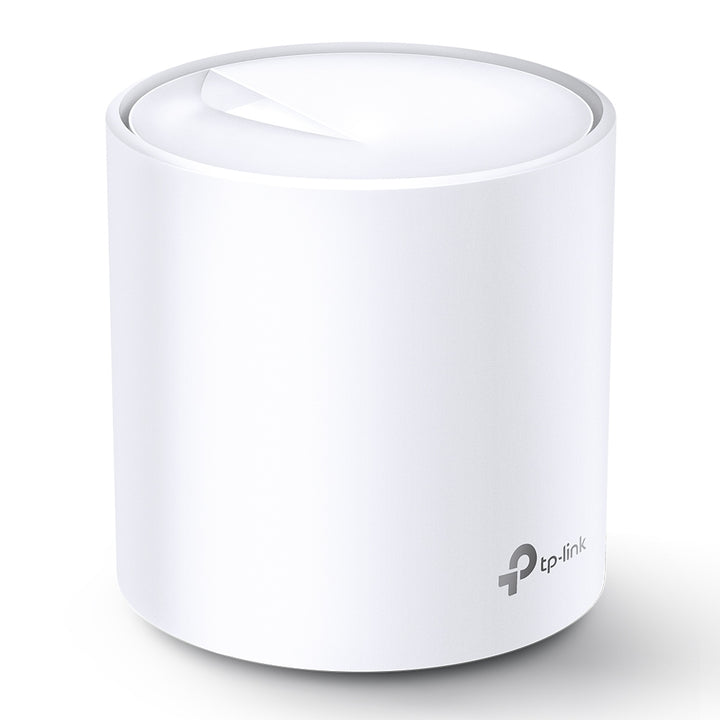


TP-Link Deco X20 AX1800 Whole Home Mesh Wi-Fi 6 System (2-Pack)
PRODUCT DESCRIPTION
TP-Link AX1800 Whole Home Mesh Wi-Fi 6 System, 2-Pack (Deco X20) - 3 Years Local Warranty
Two Deco X20 units working as one Wi-Fi name, with AX1800 dual-band Wi-Fi 6 and automatic handover as you move between them. TP-Link publishes 2-PACK Cover up to 4,000 sq.ft. in its overview band.† Each unit carries two gigabit ports with WAN/LAN auto-sensing and can take an optional Ethernet backhaul. HomeCare™ is the published service kit, and setup runs through the Deco App.
AX1800 Dual-Band Wi-Fi 6
TP-Link publishes 1201 Mbps at 5 GHz and 574 Mbps at 2.4 GHz, both on 802.11ax, across four streams. OFDMA lets each unit serve several Wi-Fi 6 clients in the same transmission slot instead of queueing them, and MU-MIMO does the same across spatial streams. Both depend on the client device supporting the feature, so older phones and laptops keep their existing behaviour. TP-Link also publishes that "Deco X20 is tested to connect over 150 devices without dragging down performance†".
One Network, Not Two
The two units share a single Wi-Fi name and password and hand devices over as you move between them. TP-Link publishes optional Ethernet backhaul, so where you already have structured cabling the pair can carry mesh traffic over the wire and leave the radios free for clients. Seamless roaming depends on the client device supporting 802.11k/v/r.
Two Gigabit Ports on Every Unit
Each Deco X20 carries two gigabit Ethernet ports with WAN/LAN auto-sensing, so whichever unit meets your fibre terminal becomes the router and the other becomes a node. That also leaves a spare wired port at each Deco for a TV box, a console or a desktop, which matters in a flat where the study is nowhere near the ONT.
HomeCare Security and Parental Controls
The X20 publishes TP-Link HomeCare™ as its service kit: an SPI firewall and access control, plus HomeCare™ Antivirus with a malicious site checker, port intrusion prevention, infected device isolation and logging. Parental controls cover custom profiles, content filtering, URL filtering, time limits, bedtime scheduling, usage monitoring and monthly reports, and HomeCare™ QoS works by device and by application. TP-Link's footnote: "§ For HomeCare™ service, TP-Link reserves the right to modify the service and feature at any time."
Ideal For
Larger HDB flats, maisonettes and condominium units in Singapore where one router leaves dead corners. Supplied by SourceIT with local Singapore warranty and GST invoice.
Deco X20 Datasheet - Technical Specifications
Wireless
| Standards and Protocols | IEEE 802.11ax/ac/n/a 5 GHz; IEEE 802.11ax/n/b/g 2.4 GHz |
| Wi-Fi Speeds | AX1800 - 5 GHz: 1201 Mbps (802.11ax), 2.4 GHz: 574 Mbps (802.11ax) |
| WiFi Capacity | High - Dual-Band: Distribute devices to different bands for optimal performance; MU-MIMO: Simultaneously communicates with multiple MU-MIMO clients; OFDMA: Simultaneously communicates with multiple WiFi 6 clients; 4 Streams: More than enough bandwidth for connected devices |
| Beamforming | Concentrates wireless signal strength towards clients to expand WiFi range |
| Wi-Fi Range | TP-Link Mesh Technology: Optional Ethernet backhaul work together to link Deco units to provide seamless coverage; 2x Antennas (Internal): Multiple antennas form a signal-boosting array to cover more directions and large areas; Beamforming: Concentrates wireless signal strength towards clients to expand WiFi range Bedroom-house rating: published by TP-Link for the 3-pack only, not for this pack size |
| Antennas | 2x antennas (internal) per unit |
| Wi-Fi Encryption | WPA-Personal, WPA2-Personal, WPA3-Personal |
| Transmit Power | CE: <20 dBm (2.4 GHz), <23 dBm (5 GHz). FCC: <30 dBm (2.4 GHz), <30 dBm (5 GHz) |
| Working Modes | Router Mode, Access Point Mode |
Hardware
| Ethernet Ports | 2x gigabit ports per Deco unit, WAN/LAN auto-sensing |
| Buttons | Reset button |
| Dimensions (W x D x H) | 110 x 110 x 114 mm (4.33 x 4.33 x 4.49 in) per unit |
| Processor | Not published by TP-Link for this model |
| Memory | Not published by TP-Link for this model |
| Weight | Not published by TP-Link for this model |
| USB | Not published by TP-Link for this model |
| Power Adapter Rating | Not published by TP-Link for this model |
Software
| Protocols | IPv4, IPv6 |
| WAN Types | Dynamic IP, Static IP, PPPoE, PPTP, L2TP |
| Guest Network | 1x 5 GHz, 1x 2.4 GHz |
| Quality of Service | HomeCare™ QoS - QoS by Device, QoS by Application |
| Parental Controls | HomeCare™ Parental Controls - custom profiles, content filtering, URL filtering, time limit, time schedule (bed time), log insight, usage monitor, monthly reports |
| Network Security | SPI firewall, access control, HomeCare™ Antivirus (malicious site checker, port intrusion prevention, infected device isolation, notification and log) |
| Service Kits | HomeCare™ |
| Network Services Enabled by Default | Web Server, DNS, DHCP Server, App management |
| IPTV | IGMP proxy, IGMP snooping, bridge, tag VLAN |
| NAT Forwarding | Port forwarding, UPnP |
| DHCP | Address reservation, DHCP client list, server |
| DDNS | TP-Link |
| Cloud Service | OTA firmware upgrade, TP-Link ID, DDNS |
| Management Features | Deco App |
| VPN Server / Client | Not published by TP-Link for this model |
Environment and Compliance
| Certification | CE, FCC, IC, RoHS, RCM, JPA, JRF, VCCI |
| Operating Temperature | 0 °C to 40 °C |
| Storage Temperature | -40 °C to 70 °C |
| Operating Humidity | 10% to 90% non-condensing |
| Storage Humidity | 5% to 90% non-condensing |
| System Requirements * | Android 5.0 or later, iOS 9.0 or later |
*Note: The minimum system requirements will be updated alongside updates to the app, subject to official website information.
Footnotes Published by TP-Link
△ Use of Wi-Fi 6 and other features including OFDMA, MU-MIMO, 1024-QAM, and BSS Color require clients to also support the corresponding features.
† Maximum wireless signal rates are the physical rates derived from IEEE Standard 802.11 specifications. Actual wireless data throughput and wireless coverage, and quantity of connected devices are not guaranteed and will vary as a result of network conditions, client limitations, and environmental factors, including building materials, obstacles, volume and density of traffic, and client location.
‡ Clients need to support 802.11k/v/r and may require additional set up. Performance may vary depending on the client device.
§ For HomeCare™ service, TP-Link reserves the right to modify the service and feature at any time.
TP-Link's Singapore support page lists hardware revisions V1, V1.20, V1.26, V2 and V4 and defaults to V4, while the Singapore product page serves V1 specifications.
Compatibility & Software Support
Set up and managed through the Deco App. TP-Link publishes the minimum system requirements as Android 5.0 or later and iOS 9.0 or later, with this note: "*Note: The minimum system requirements will be updated alongside updates to the app, subject to official website information."
Two working modes are published, Router and Access Point, with IPv4 and IPv6, and Dynamic IP, Static IP, PPPoE, PPTP or L2TP on the WAN. IPTV covers IGMP proxy, IGMP snooping, bridge and tag VLAN, which is what a set-top box on a Singapore fibre plan generally needs. If you need VPN on the router itself, ask us and we will point you at a Deco that publishes one.
The two units share one Wi-Fi name and password, and further Deco X20 units can be added to the same network later. Wi-Fi 6 features and seamless roaming both depend on the client device supporting them.
HomeCare™ is the service kit published for this model, covering antivirus, parental controls and QoS. TP-Link's footnote: "§ For HomeCare™ service, TP-Link reserves the right to modify the service and feature at any time."
Package Contents & Ordering Information
Package Contents
| In the Box | 2 Deco X20 units, 1 RJ45 Ethernet cable, 2 power adapters, 1 Quick Installation Guide |
The In the Box row above is TP-Link's published package-contents value for this pack size.
Ordering Information
| Model | Deco X20, 2-Pack |
| SourceIT SKU | Deco X20(2-pack) |
| Warranty | 3 Years Local Warranty (Singapore) |
This box ships 2 units and 2 power adapters but a single RJ45 Ethernet cable, so plan for extra patch leads if you intend to run Ethernet backhaul between the units. Tell us what you need and we will quote them. Ask us to confirm the hardware revision in stock if a particular figure matters to you.
Datasheet & Downloads
TP-Link Singapore support and downloads - Deco X20
Official product page - Deco X20
TP-Link Singapore replacement warranty policy
Firmware, user guides and the Deco App are published by TP-Link on the support page above. SourceIT does not host copies, so the links always resolve to the current release.
Frequently Asked Questions - Deco X20 (2-Pack)
How much area does the 2-pack cover?
TP-Link publishes 2-PACK Cover up to 4,000 sq.ft. in its overview band for the Deco X20. Its footnote: "† Maximum wireless signal rates are the physical rates derived from IEEE Standard 802.11 specifications. Actual wireless data throughput and wireless coverage, and quantity of connected devices are not guaranteed and will vary as a result of network conditions, client limitations, and environmental factors, including building materials, obstacles, volume and density of traffic, and client location."
How many devices can it handle?
TP-Link publishes: "Deco X20 is tested to connect over 150 devices without dragging down performance†".
Can I add a third unit later?
Yes. Further Deco X20 units join the same network on one Wi-Fi name and password. Buying a 2-pack now and adding a single unit later is a normal upgrade path.
Do I get an Ethernet cable for each unit?
No. This 2-pack ships two units and two power adapters alongside a single RJ45 Ethernet cable. We can supply extra patch leads if you plan to run Ethernet backhaul between the units.
Does it work with my existing router?
Yes. In Access Point mode the Decos sit behind an existing router; in Router mode they replace it. Both modes are published for this model.
Does it support a VPN?
The Deco X20 does not offer a router-level VPN. Ask us and we will point you at a Deco that does.
Which hardware revision will I receive?
TP-Link's Singapore product page publishes V1 specifications, while its Singapore support page lists V1, V1.20, V1.26, V2 and V4 and defaults to V4. Ask us before ordering if a particular figure matters and we will confirm the revision with the distributor.
What warranty applies in Singapore?
Three years local replacement warranty under TP-Link Singapore's published policy, with a GST invoice on every unit.


