
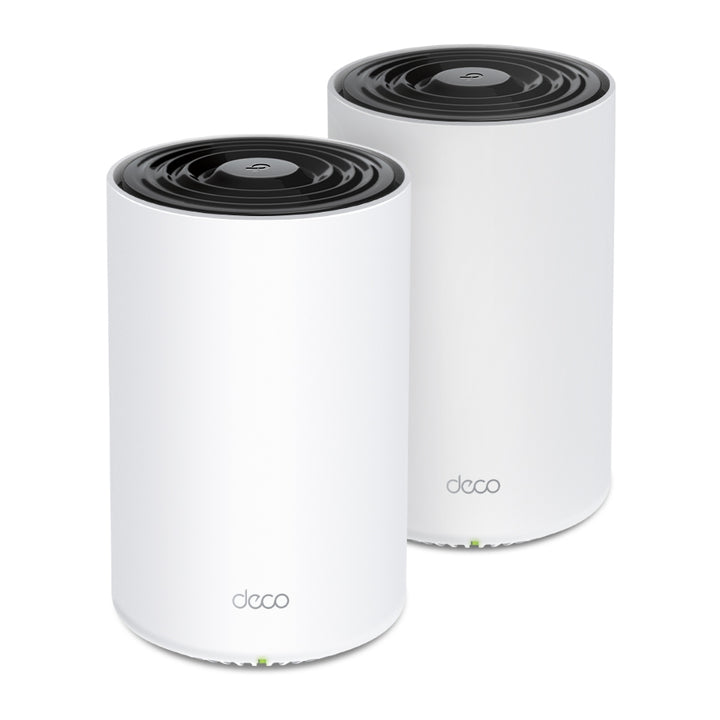


TP-Link Deco PX50 AX3000 + G1500 Whole Home Powerline Mesh WiFi 6 System (2-pack)
PRODUCT DESCRIPTION
TP-Link AX3000 + G1500 Whole Home Powerline Mesh WiFi 6 System (Deco PX50, 2-pack) - 3 Years Local Warranty
The Deco PX50 is a mesh system for homes where a wireless hop between nodes is not dependable. Each unit is a WiFi 6 router with a G.hn powerline radio built in, so the units can link over the household electrical wiring when walls or floors get in the way. This is the two-unit pack, rated by TP-Link for up to 4,500 ft² or 420 m².
Powerline Backhaul Where Wireless Backhaul Fails
An ordinary mesh kit spends part of its radio capacity carrying traffic between nodes, and in a concrete flat or a two-storey house that hop is often the weak point. The Deco PX50 adds a G.hn powerline path between units, published at 1.5 Gbps. That figure is a maximum physical rate derived from G.hn Standard specifications — actual Powerline data throughput and Powerline range are not guaranteed and vary with network conditions and environmental factors, including electrical interference, the volume of traffic and network overhead, AFCI circuit breaker, and Powerline being located in a separate circuit. Both paths stay available and the system uses whichever works.
AX3000 Dual-Band WiFi 6 on Both Units
Wireless is published at 2402 Mbps on 5 GHz and 574 Mbps on 2.4 GHz, both 802.11ax. TP-Link rates WiFi capacity as Medium: Dual-Band distributes devices to different bands for optimal performance, MU-MIMO communicates simultaneously with multiple MU-MIMO clients, and OFDMA communicates simultaneously with multiple WiFi 6 clients. The system is rated for over 150 devices. Each unit carries three Gigabit Ethernet ports with WAN/LAN auto-sensing, so a desk, a TV point or a NAS can be wired at either node.
One Network Name, Automatic Roaming
The two units present a single WiFi network. Phones and laptops move between them without dropping calls or re-authenticating. TP-Link notes that clients need to support 802.11k/v/r and may require additional set up, and that performance may vary depending on the client device. Two dual-band antennas per unit form a signal-boosting array to cover more directions and large areas. WPA3 is supported alongside WPA and WPA2, with separate 5 GHz and 2.4 GHz guest networks for visitors and smart-home devices.
HomeShield Security and Parental Controls
HomeShield is TP-Link's security and parental-control service for the Deco range. Network protection covers Real-Time IoT Protection, Malicious Site Blocker, Intrusion Prevention and Home Network Scanner. Parental controls cover Content Filter, Bedtime and Time Rewards, and Quality of Service offers Device Priority. HomeShield includes the Free Basic Plan, and fees apply for the Pro Plan. All information applied in AI algorithms is stored locally in the Deco device, and none of it is uploaded to the cloud.
Voice Control, IPTV and ISP Compatibility
Use an Amazon Alexa or Google Assistant-enabled device to control Deco PX50 with just your voice. The system supports IGMP proxy and snooping, bridge mode and tagged VLAN for IPTV, plus dynamic IP, static IP, PPPoE, L2TP and PPTP WAN types, so it fits Singapore fibre installations and ISP router replacements. It runs as a router or as an access point behind an existing gateway, with the Deco app handling setup, device lists and firmware updates.
Ideal For
Medium-sized Singapore homes — 4- and 5-room flats, maisonettes and two-storey terraces — where one extra node in the right place fixes the dead corner, and for anyone who wants mesh coverage without running Ethernet between rooms. Supplied by SourceIT with local Singapore warranty, GST invoice and project pricing on request.
G.hn powerline is a different standard from HomePlug AV/AV2. TP-Link states that G.hn powerline adapters are not compatible with HomePlug AV/AV2 powerline adapters, so the Deco PX50 will not join a network built from TL-PA or TL-WPA units.
The Deco PX50 has no published processor, memory, power supply rating, power consumption, LED description, net weight or powerline range figure.
Deco PX50 (2-pack) Datasheet — Technical Specifications
General
| Model | Deco PX50 (2-pack) |
| Official Product Name | AX3000 + G1500 Whole Home Powerline Mesh WiFi 6 System |
| Brand | TP-Link Deco |
| Warranty | 3 Years Local Warranty (Singapore) |
Specifications
| Standards and Protocols | IEEE 802.11ax/ac/n/a 5 GHz; IEEE 802.11ax/n/b/g 2.4 GHz |
| WiFi Speeds | 5 GHz: 2402 Mbps (802.11ax); 2.4 GHz: 574 Mbps (802.11ax) † |
| Powerline Speeds | G.hn 1.5 Gbps Powerline *** |
| WiFi Range | 4-6+ Bedroom Houses (3-pack) — TP-Link Mesh Technology: Optional Ethernet backhaul work together to link Deco units to provide seamless coverage; Powerline Technology: Uses your home's electrical wiring to create stronger connections between Deco units, reducing the impact of walls or other obstacles on signal; 2 x dual-band antennas: Multiple antennas form a signal-boosting array to cover more directions and large areas |
| Coverage | Up to 4,500 ft² or 420 m² (2-pack) † |
| Device Capacity | Over 150 devices † |
| WiFi Capacity | Medium — Dual-Band: Distribute devices to different bands for optimal performance; MU-MIMO: Simultaneously communicates with multiple MU-MIMO clients; OFDMA: Simultaneously communicates with multiple WiFi 6 clients |
| Working Modes | Router Mode, Access Point Mode |
| Antenna | 2 x dual-band antennas |
| Powerline Standard | G.hn ‡ |
| Ethernet Ports | 3 x Gigabit ports per Deco unit; WAN/LAN auto-sensing |
| Buttons | Reset Button |
| WiFi Transmission Power | CE: <20 dBm (2.4 GHz) <23 dBm (5 GHz) FCC: <30 dBm |
| Network Security | SPI Firewall, Access Control |
| Guest Network | 1x 5 GHz Guest Network, 1x 2.4 GHz Guest Network |
| WiFi Encryption | WPA/WPA2/WPA3 |
| Protocols | IPv4, IPv6 |
| Service Kit | HomeShield ** |
| WAN Types | Dynamic IP, Static IP, PPPoE, L2TP, PPTP |
| Quality of Service | HomeShield QoS by Device |
| Cloud Service | OTA Firmware Upgrade, TP-Link ID, DDNS |
| NAT Forwarding | Port Forwarding, UPnP |
| IPTV | IGMP Proxy, IGMP Snooping, Bridge, Tag VLAN |
| DHCP | Address Reservation, DHCP Client List, Server |
| DDNS | TP-Link |
| Management | Deco App |
| Network Services Enabled by Default | Web Server Manage and configure device through web (HTTP/HTTPS) • Port: 80/443 Protocol: TCP — DNS DNS • Port: 53 Protocol: TCP & UDP — DHCP Server IP address assignment (DHCP) • Port: 67 Protocol: UDP — App management Manage and configure device through app • Port: 22 Protocol: TCP • Port: 20001 Protocol: TCP • Port: 30001 Protocol: TCP • Port: 20002 Protocol: UDP |
| Dimensions (W x D x H) | 4.1 x 4.1 x 6.7 in (105 x 105 x 169 mm) |
| Operating Temperature | 0°C~40°C (32°F~104°F) |
| Storage Temperature | -40°C~60°C (-40°F~140°F) |
| Operating Humidity | 10%~90% RH |
| Storage Humidity | 5%~90% RH |
| Certification | CE, FCC, RoHS |
Footnotes
| † | Maximum wireless signal rates are the physical rates derived from IEEE Standard 802.11 specifications. Actual wireless data throughput and wireless coverage, and quantity of connected devices are not guaranteed and will vary as a result of network conditions, client limitations, and environmental factors, including building materials, obstacles, volume and density of traffic, and client location. |
| ‡ | G.hn powerline adapters are not compatible with HomePlug AV/AV2 powerline adapters. |
| △ | All information applied in AI algorithms will only be stored locally in the Deco device. None of it will be uploaded to the cloud. |
| * | Clients need to support 802.11k/v/r and may require additional set up. Performance may vary depending on the client device. |
| ** | HomeShield includes the Free Basic Plan. Fees apply for the Pro Plan. Visit tp-link.com/homeshield for more information. |
| *** | Compatible with all G.hn Standard Powerline Deco. Not compatible with HomePlug AV and AV2 Standard Powerline Deco. Maximum Powerline signal rates are the physical rates derived from G.hn Standard specifications. Actual Powerline data throughput and Powerline range are not guaranteed and will vary as a result of network conditions and environmental factors, including electrical interference, the volume of traffic and network overhead, AFCI circuit breaker, and Powerline being located in a separate circuit. |
The specification rows and the six footnotes above are as published by TP-Link for the Deco PX50; the warranty row is SourceIT's Singapore term.
Compatibility & Software Support
| Powerline Standard | G.hn |
| HomePlug AV / AV2 Adapters | Not compatible. G.hn powerline adapters are not compatible with HomePlug AV/AV2 powerline adapters, so TL-PA and TL-WPA units cannot join a Deco PX50 network |
| Other Deco Units | Compatible with all G.hn Standard Powerline Deco; not compatible with HomePlug AV and AV2 Standard Powerline Deco |
| Working Modes | Router Mode or Access Point Mode — can sit behind an existing ISP gateway |
| App | Deco App, with TP-Link ID cloud access and OTA firmware upgrades |
| Security Service | HomeShield, including the Free Basic Plan; fees apply for the Pro Plan |
| Roaming | Seamless roaming between units. Clients need to support 802.11k/v/r and may require additional set up; performance may vary depending on the client device |
| Voice Control | Use an Amazon Alexa or Google Assistant-enabled device to control Deco PX50 with just your voice |
*** Compatible with all G.hn Standard Powerline Deco. Not compatible with HomePlug AV and AV2 Standard Powerline Deco. Maximum Powerline signal rates are the physical rates derived from G.hn Standard specifications. Actual Powerline data throughput and Powerline range are not guaranteed and will vary as a result of network conditions and environmental factors, including electrical interference, the volume of traffic and network overhead, AFCI circuit breaker, and Powerline being located in a separate circuit.
The rows above, and the *** footnote, are as published by TP-Link for the Deco PX50.
Package Contents & Ordering Information
What's in the Box
| Package Content | Deco PX50 (2-pack): 2x Deco PX50 Units(routers with powerline), 1x RJ45 Ethernet Cable, 2x Power Cords, Quick Installation Guide |
Ordering Information
| Model | Deco PX50 (2-pack) |
| SKU | Deco PX50(2-pack) |
| Warranty | 3 Years Local Warranty (Singapore) |
| Other Pack Sizes | Also available as a 3-pack, rated by TP-Link for up to 6,500 ft² or 600 m² |
The Package Content row is as published by TP-Link; the SKU, the warranty term and the pack availability are SourceIT's.
Datasheet & Downloads
Official TP-Link Deco PX50 product page (Singapore)
Deco PX50 firmware and documentation (TP-Link support)
TP-Link replacement warranty policy
These links go to TP-Link's own product, support and warranty pages.
Frequently Asked Questions — Deco PX50 (2-pack)
Will it work with my existing TP-Link powerline adapters?
No. The Deco PX50 uses G.hn powerline, and TP-Link states that G.hn powerline adapters are not compatible with HomePlug AV/AV2 powerline adapters. TL-PA and TL-WPA units will not join a PX50 network.
Do both units need to be on the same electrical circuit?
They should be on the same electrical installation for the powerline path to work well. TP-Link names electrical interference, the volume of traffic and network overhead, AFCI circuit breaker, and Powerline being located in a separate circuit as factors that affect Powerline throughput and range. Where the powerline link is poor, the units still mesh wirelessly — that is the point of the hybrid design.
Should I buy the 2-pack or the 3-pack?
TP-Link rates the 2-pack for up to 4,500 ft² or 420 m² and the 3-pack for up to 6,500 ft² or 600 m². Those are published coverage figures, not guarantees — layout and wall construction matter. Send us your floor plan and we will advise.
Can I control it by voice?
Yes. Use an Amazon Alexa or Google Assistant-enabled device to control Deco PX50 with just your voice.
What warranty does SourceIT provide?
Three years local Singapore warranty, in line with TP-Link's published replacement warranty for this category. Every system sold by SourceIT comes with a GST invoice.
Can SourceIT quote this for a project?
Yes. Send us the unit count or the floor plan and we will quote.


