
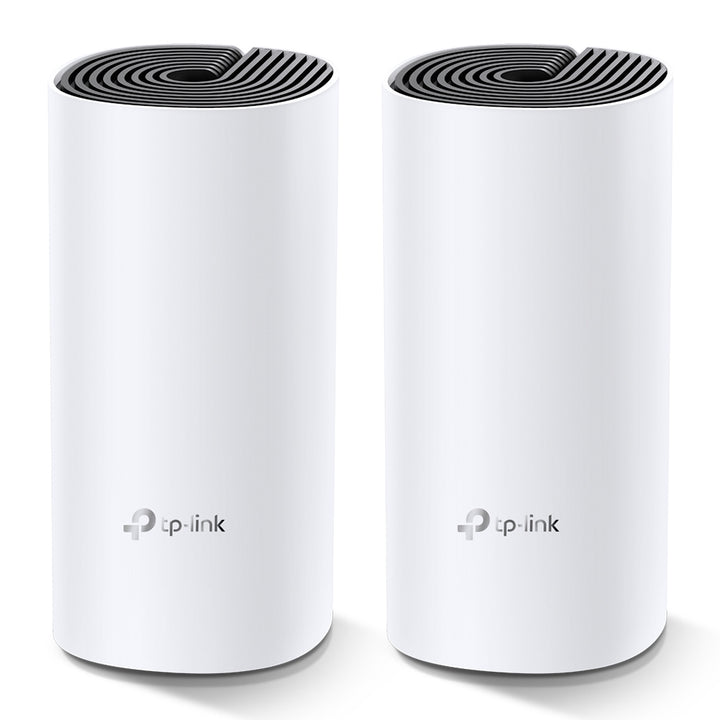


TP-Link Deco M4 AC1200 Whole Home Mesh Wi-Fi System, 2-Pack
PRODUCT DESCRIPTION
TP-Link AC1200 Whole Home Mesh Wi-Fi System, 2-Pack (Deco M4) - 3 Years Local Warranty
The Deco M4 is TP-Link's entry-level Wi-Fi 5 mesh system, sold here as a two-unit pack. Each Deco M4R unit runs dual-band AC1200 with two internal antennas and two auto-sensing Gigabit ports, and the pair forms a single roaming network set up from the Deco app. It is the straightforward choice for a flat or a maisonette where one router is not reaching the far rooms.
Dual-Band AC1200 Across Two Units
TP-Link publishes IEEE 802.11ac/n/a on 5 GHz at up to 867 Mbps and IEEE 802.11n/b/g on 2.4 GHz at up to 300 Mbps, with MU-MIMO and beamforming, and up to 100 connected devices across the system. These are physical link rates from the IEEE specification rather than guaranteed throughput, and real coverage and device counts vary with building materials, interference and where the units are placed. Each unit carries two internal dual-band antennas.
What TP-Link Publishes for Coverage
TP-Link publishes one square-footage figure for the M4 and ties it to this pack size and to a market: up to 2,800 square feet for the 2-pack, EU version. It publishes no square-footage figure for the 1-pack, and describes the 3-pack only as suiting 3 to 5 bedroom houses. We reproduce that figure with TP-Link's own qualifier attached rather than rounding it up or presenting it as an SG figure. If you tell us the layout and the wall construction we will say honestly whether two units will do it.
Two Gigabit Ports on Every Unit
Each M4R has two Gigabit Ethernet ports with WAN/LAN auto-sensing, so whichever unit meets the modem becomes the router and the other has both ports free for a desktop, a console, a TV box or a switch. A wired backhaul between units is the usual way to fix a stubborn dead zone in a concrete HDB or condominium wall. There is one reset button on the underside and no other controls.
Deco App, Parental Controls and Working Modes
Setup and management run entirely from the Deco app on Android 5.0 or later or iOS 9.0 or later. Published software features include URL filtering and time controls for parental use, QoS by device, port forwarding and UPnP, IPv4 and IPv6, DHCP with address reservation, IPTV with IGMP proxy and snooping, bridge and tag VLAN, TP-Link DDNS, OTA firmware upgrade and TP-Link ID. The system runs in router mode or access point mode, and supports a 2.4 GHz and a 5 GHz guest network.
What TP-Link Publishes, and What It Does Not
Published Wi-Fi encryption for this model is WPA-Personal and WPA2-Personal. WPA3 is not published for the M4 and is not claimed here - if WPA3 matters, look at the Deco X50 or another Wi-Fi 6 model in the range and ask us for the comparison. TP-Link also publishes no processor row, no HomeShield tier, no EasyMesh or AI-Driven Mesh entry, no VPN server or client, no OFDMA row, no antenna gain and no product weight for the M4. None of those is claimed here.
Ideal For
Singapore HDB flats, condominium units and small offices on a Wi-Fi 5 connection that need to kill one or two dead rooms without rewiring, and want the whole thing set up from a phone in a few minutes. Supplied by SourceIT with local Singapore warranty, GST invoice and volume pricing on request.
Deco M4 Datasheet — Technical Specifications
General
| Model | Deco M4 (2-Pack) |
| Official Product Name | AC1200 Whole Home Mesh Wi-Fi System |
| Unit Name | Deco M4R |
| Brand | TP-Link |
| Warranty | 3 Years Local Warranty (Singapore) |
Wireless
| Standards and Protocols | IEEE 802.11ac/n/a 5 GHz; IEEE 802.11n/b/g 2.4 GHz |
| Wi-Fi Speeds | 5 GHz: 867 Mbps (802.11ac); 2.4 GHz: 300 Mbps (802.11n) |
| Wi-Fi Range | 3-5 bedroom houses (3-pack); 2 x internal antennas per unit; beamforming |
| Coverage (2-Pack) | Up to 2,800 square feet (2-pack, EU version) - TP-Link's own wording |
| Wi-Fi Capacity | Medium; dual-band; MU-MIMO; up to 100 devices |
| Working Modes | Router mode; access point mode |
| Transmission Power | CE: less than 20 dBm (2.4 GHz), less than 23 dBm (5 GHz); FCC: less than 30 dBm |
Hardware
| Ethernet Ports | 2 x Gigabit ports per Deco unit, WAN/LAN auto-sensing |
| Buttons | 1 x reset button on the underside |
| Dimensions (W x D x H) | 3.6 x 3.6 x 7.5 in (90.7 x 90.7 x 190 mm) |
| Power Adapter | Input 100-240 V, 50/60 Hz, 0.3 A; Output 12 V DC, 1 A (datasheet figures; not published on the SG product page) |
Software and Security
| Protocols | IPv4; IPv6 |
| WAN Types | Dynamic IP; Static IP; PPPoE; PPTP; L2TP |
| Parental Controls | URL filtering; time controls |
| Quality of Service | QoS by device; WMM |
| NAT Forwarding | Port forwarding; UPnP |
| IPTV | IGMP proxy; IGMP snooping; bridge; tag VLAN |
| DHCP | Server; address reservation; DHCP client list |
| Cloud Service | OTA firmware upgrade; TP-Link ID; DDNS (TP-Link) |
| Network Security | SPI firewall; access control |
| Guest Network | 1 x 5 GHz and 1 x 2.4 GHz guest network |
| Wi-Fi Encryption | WPA-Personal; WPA2-Personal |
| Management | Deco App |
Environment and Certification
| Operating Temperature | 0 to 40 °C |
| Storage Temperature | -40 to 70 °C |
| Operating / Storage Humidity | 10 to 90 percent / 5 to 90 percent, non-condensing |
| Certification | CE, FCC, IC, NCC, BSMI, IDA, RCM, JPA, JRF, VCCI, KC, RoHS |
TP-Link publishes no processor row, no product weight, no antenna gain in dBi and no watt figure for power consumption for the Deco M4, and no HomeShield, EasyMesh, AI-Driven Mesh, WPA3, OFDMA or VPN entry. None of those is claimed here or carried across from another Deco model. The power-adapter figures above come from TP-Link's own Deco M4 datasheet, which is the only place they are published.
Compatibility & Software Support
| App | Deco App - Android 5.0 or later, iOS 9.0 or later |
| Mesh Expansion | Additional Deco units can be added to the same network; ask us which models TP-Link lists as compatible before mixing ranges |
| Backhaul | Wireless, or wired over the Gigabit ports |
| Modem / ONT | Works with a Singapore fibre ONT in router mode, or behind an existing router in access point mode |
| Wi-Fi Encryption | WPA-Personal and WPA2-Personal. WPA3 is not published for this model |
| Client Devices | Any 2.4 GHz or 5 GHz Wi-Fi client; 867 Mbps requires an 802.11ac client |
TP-Link does not publish a voice-assistant or IFTTT integration row for the Deco M4 on its SG page, so none is claimed here.
Package Contents & Ordering Information
Package Contents (2-Pack)
| In the box | 2 x Deco M4R units; 1 x RJ45 Ethernet cable; 2 x power adapters; 1 x Quick Installation Guide |
Note that TP-Link's published 2-pack contents include only ONE Ethernet cable for two units, as with every Deco multi-pack. Order a second patch lead from us if you plan a wired backhaul.
Ordering Information
| Model | Deco M4 (2-Pack) |
| SKU | Deco M4(2-pack) |
| Warranty | 3 Years Local Warranty (Singapore) |
| Other Pack Sizes | TP-Link also publishes a 1-pack and a 3-pack of the Deco M4 - ask us for the pack that suits the floor area |
Datasheet & Downloads
Frequently Asked Questions — Deco M4 2-Pack
How much area will two units cover?
TP-Link publishes up to 2,800 square feet for the 2-pack, and attaches the qualifier "EU version" to that figure itself. Coverage in practice depends on walls, layout and interference. Send us your floor plan and we will give you an honest view on whether two units are enough.
Does the Deco M4 support WPA3?
No. TP-Link publishes WPA-Personal and WPA2-Personal for this model and no WPA3 row, so we do not claim it. If WPA3 is a requirement, ask us about the Wi-Fi 6 Deco models.
Can I run a wired backhaul between the two units?
Yes. Each unit has two auto-sensing Gigabit ports, so you can run a patch lead between them where a wall is defeating the wireless link. Note the box contains only one Ethernet cable.
Can I add more units later?
Yes. Deco units join the same network from the app. Ask us which models TP-Link currently lists as compatible with the M4 before mixing generations.
What warranty does SourceIT provide?
Three years local Singapore warranty. Every Deco M4 2-pack sold by SourceIT comes with a GST invoice.
Can SourceIT quote this in volume?
Yes. Send us the quantity and we will quote, including for serviced apartments and multi-unit fit-outs where the mesh kits, switching and cabling come from us as one order.


