
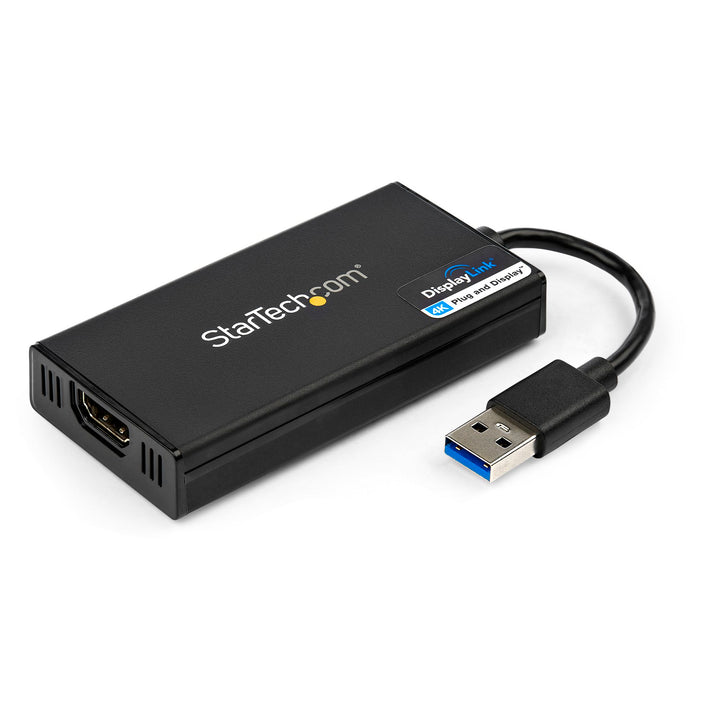


StarTech.com USB32HD4K USB 3.0 to HDMI Adapter 4K 30Hz DisplayLink
Prices in SGD, excluding 9% GST.
PRODUCT DESCRIPTION
StarTech.com USB32HD4K USB 3.0 to HDMI Adapter 4K 30Hz DisplayLink - 2 Years Local Warranty
A USB-powered external video card that connects a laptop or desktop to an HDMI monitor, TV or projector through a single USB Type-A port, at up to 4K 30Hz.
Performance
Up to 4K 30Hz (UHD) with 5.1ch audio through HDMI and HDCP 2.2. USB bus-powered and compatible with 1080p.
Increase Productivity
Add a display in extended mode (two displays in total including the laptop screen) through a USB-A port. Supports ultrawide displays up to 3440x1440 and enables an extended display on Apple M1/M2/M3 MacBooks.
Compatibility
Works with Windows, macOS 10.14+, ChromeOS and Linux, on any USB-A laptop, Ultrabook, desktop or small form factor system, even if 4K output is not natively supported by the laptop or video card.
Driver Note
A driver is required for macOS and Windows; ChromeOS installs it automatically. The adapter will not work with macOS 10.13.4 to 10.13.6.
StarTech.com USB32HD4K Datasheet — Technical Specifications
General
| Product Name | USB 3.0 to HDMI Adapter, 4K 30Hz UHD, DisplayLink Certified, for Mac and Windows - TAA |
| Brand | StarTech.com |
| Model | USB32HD4K |
| Local Warranty (Singapore) | 2 years warranty |
| Special Notes | This USB video adapter is not intended for graphical intensive applications, such as gaming. |
| System Requirements | System Processor: Quad Core 2.4GHz (i5 recommended); System Memory: 4GB |
| Microsoft WHQL Certified | Yes |
Physical and Environmental
| Colour | Black |
| Material | Plastic |
| Cable Length | 2.5 in [63.5 mm] |
| Product Length | 7.9 in [20 cm] |
| Product Width | 1.8 in [45 mm] |
| Product Height | 0.6 in [15 mm] |
| Product Weight | 2.3 oz [65 g] |
| Operating Temperature | 0°C to 40°C (32°F to 104°F) |
Performance
| Maximum Digital Resolutions | 4K x 2K @ 30Hz |
| Supported Resolutions (Widescreen) | 3840x2160, 2048x1152, 1920x1200, 1920x1080, 1680x1050, 1366x768, 1280x800, 1280x768, 1280x720 |
| Supported Resolutions (Standard) | 1600x1200, 1400x1050, 1280x1024, 1024x768, 800x600, 640x480 |
| Audio Specifications | HDMI - 5.1 Channel Audio |
| Wide Screen Supported | Yes |
| MTBF | 43,341 hours |
Hardware
| AV Input | USB 3.2 Gen 1 (5Gbps) |
| AV Output | HDMI |
| Number of Ports | 1 |
| Number of Displays | 1 |
| Audio | Yes |
| USB Pass-Through | No |
| Memory | 1Gb |
| Chipset ID | DisplayLink - DL-5500 |
Connectors
| Connector 1 | 1 x USB-A (5Gbps, 4.5W) |
| Connector 2 | 1 x HDMI |
Power
| Power Source | USB-Powered |
| Input Voltage | 5V DC |
| Output Voltage | 5 DC |
Compatibility & Applications
- Windows, macOS 10.14+, ChromeOS and Linux (not macOS 10.13.4 to 10.13.6)
- Any USB-A laptop, Ultrabook, desktop PC or small form factor system
- Adding an HDMI monitor, TV or projector in extended mode; not intended for gaming
Package Contents & Ordering Information
In the Box
- 1 x USB 3.0 to HDMI External Video Card
- 1 x Software Installation Disc
- 1 x Instruction Manual
Order Codes
| USB32HD4K | USB 3.0 to HDMI Adapter, 4K 30Hz, DisplayLink Certified |
Datasheet & Downloads
Frequently Asked Questions — StarTech.com USB32HD4K
Do I need a driver?
Yes for macOS and Windows. ChromeOS installs the driver automatically.
Does 4K run at 60Hz?
No. The maximum is 4K at 30Hz.
What warranty do I get?
2 years local warranty from StarTech.com. Supplied by SourceIT with a GST invoice.
USB-A Display Adapter Family / DisplayLink | StarTech.com
How to Install DisplayLink Video Adapters (Windows) | StarTech.com
We Also Recommend


StarTech.com 1612B-DESK-PEGBOARD Clamp-On Pegboard Desktop Organiser, 42 x 32cm


StarTech.com DISPL50CM/DISPL1M/DISPL2M/DISPL3M/DISPL5M/DISPLPORT20L/DISPL7M DisplayPort 1.2 Cable with Latches 4K


StarTech.com HDMM10M/HDMM15M High Speed HDMI Cable 4K


StarTech.com RUSBLTMM30CMW 30cm Durable White USB-A to Lightning Cable, MFi Certified


StarTech.com RUSBLTMM15CMB/RUSBLTMM30CMB Durable Black USB-A to Lightning Cable, MFi Certified