
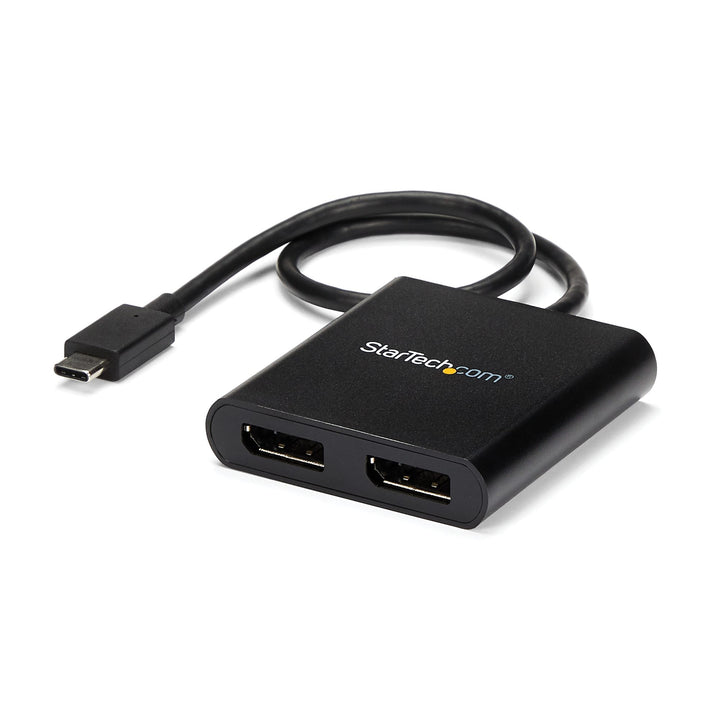


StarTech.com MSTCDP122DP USB-C to Dual DisplayPort 1.2 MST Hub
Prices in SGD, excluding 9% GST.
PRODUCT DESCRIPTION
StarTech.com MSTCDP122DP USB-C to Dual DisplayPort 1.2 MST Hub - 3 Years Local Warranty
A USB Type-C MST hub that connects a USB-C device to two independent DisplayPort monitors for a dual-display workstation.
Multi-Monitor Configuration
Drives up to 2x 4K 30Hz or 2x 1080p 60Hz DP monitors from a USB-C DP Alt-Mode port on Windows laptops. TB3/TB4/USB4 compatible. Not compatible with macOS.
No Drivers or Software
Adds two extended or mirrored displays to a Windows laptop, using the integrated or discrete GPU (Intel/AMD/Nvidia) for high-performance graphics with minimal CPU usage.
Hardware Compatibility
The host system must support DP Alt Mode 1.2 / HBR2 / MST. Verify the maximum number of displays supported by your GPU; some GPU chips (such as Intel HD Graphics) support a maximum of three displays.
Extra-Long Cable
The built-in cable gives extended reach and reduces USB-C port and connector strain on 2-in-1 devices and laptops on riser stands. The Windows Layout Utility restores window positions when the adapter is reconnected.
StarTech.com MSTCDP122DP Datasheet — Technical Specifications
General
| Product Name | USB-C to Dual DisplayPort 1.2 Adapter, USB Type-C Multi-Monitor MST Hub |
| Brand | StarTech.com |
| Model | MSTCDP122DP |
| Local Warranty (Singapore) | 3 years warranty |
| Special Notes | DisplayPort 1.2 with MST+HBR2 support from the GPU is required for independent display output. Your USB-C equipped device must support video (DP alt mode) to work with this adapter. |
Physical and Environmental
| Colour | Black |
| Cable Length | 12.8 in [32.4 cm] |
| Product Length | 15.2 in [38.6 cm] |
| Product Width | 2.3 in [58.0 mm] |
| Product Height | 0.6 in [14.0 mm] |
| Product Weight | 1.6 oz [44.0 g] |
| Operating Temperature | 5°C to 35°C (41°F to 95°F) |
Performance
| Maximum Digital Resolutions | 3840x2160 @ 30Hz |
| MST Bandwidth | MST shares 21.6 Gbps across all attached displays; higher resolutions can restrict the bandwidth available to the remaining port |
| Average Bandwidth Allocation | 1920x1080 @ 60Hz - 22%, 1920x1200 @ 60Hz - 30%, 2560x1440 @ 60Hz - 35%, 2560x1600 @ 60Hz - 38%, 3840x2160 @ 30Hz - 38% (exceeding 100% will reduce functionality) |
| HDR Support | No |
| Audio Specifications | DisplayPort - 5.1 Channel Audio |
| Maximum Cable Distance To Display | 6.6 ft [2 m] |
| Wide Screen Supported | Yes |
Hardware
| AV Input | USB-C |
| AV Output | DisplayPort - 1.2 |
| Number of Ports | 2 |
| Number of Displays | 2 |
| Audio | Yes |
| Chipset ID | MegaChips - STDP4320, VIA/VLI - VL100 |
Connectors
| Connector 1 | 1 x USB-C DP++ (DP Alt-Mode) |
| Connector 2 | 2 x DisplayPort |
Power
| Power Source | USB-Powered |
| Power Delivery | No PD Pass-Through |
Compatibility & Applications
- Windows laptops with a USB-C port supporting DP Alt Mode 1.2, HBR2 and MST (TB3/TB4/USB4 compatible)
- Not compatible with macOS
- Extended or mirrored dual-display setups in the office, home office and shared workspaces
Package Contents & Ordering Information
In the Box
- 1 x MST hub
- 1 x Quick-start guide
Order Codes
| MSTCDP122DP | USB-C to 2x DisplayPort 1.2 MST hub |
Datasheet & Downloads
Frequently Asked Questions — StarTech.com MSTCDP122DP
Does my USB-C port need to support video?
Yes. The USB-C device must support video (DP Alt Mode), and the GPU must support DisplayPort 1.2 with MST and HBR2 for independent display output.
Does it charge my laptop?
No. The hub is USB-powered and has no PD pass-through.
What warranty do I get?
3 years local warranty from StarTech.com. Supplied by SourceIT with a GST invoice.
We Also Recommend


StarTech.com 1612B-DESK-PEGBOARD Clamp-On Pegboard Desktop Organiser, 42 x 32cm


StarTech.com DISPL50CM/DISPL1M/DISPL2M/DISPL3M/DISPL5M/DISPLPORT20L/DISPL7M DisplayPort 1.2 Cable with Latches 4K


StarTech.com HDMM10M/HDMM15M High Speed HDMI Cable 4K


StarTech.com RUSBLTMM30CMW 30cm Durable White USB-A to Lightning Cable, MFi Certified


StarTech.com RUSBLTMM15CMB/RUSBLTMM30CMB Durable Black USB-A to Lightning Cable, MFi Certified