
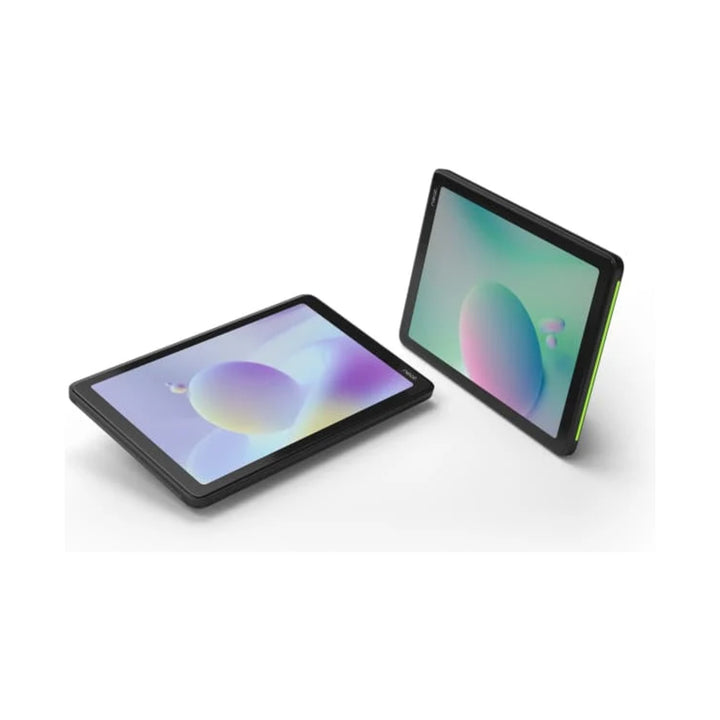


Neat Pad 8-inch Room Controller & Scheduling Display
Email sales@sourceit.com.sg or use Request for Quotation below and our team will confirm the latest price, availability and lead time.
PRODUCT DESCRIPTION
Neat Pad 8-inch Room Controller & Scheduling Display
Use Neat Pad inside the room to start and run meetings with one touch, or mount it outside as a room-availability display that lets people book the space.
Key Features
- 8-inch angled touchscreen with anti-glare, anti-smudge coating.
- Side LED status lights visible from down the corridor when used as a scheduler.
- Built-in ambient light, temperature, humidity, CO2 and VOC sensors.
- Ultrasonic pairing for Zoom Rooms plus one-tap and wireless screen sharing.
- Single PoE cable for power and network, or Wi-Fi with the optional AC adapter; wall and side mounts included.
Neat Pad Datasheet — Technical Specifications
General
| Product Name | Neat Pad 8-inch Room Controller & Scheduling Display |
| Brand | Neat |
| Part Number | NEATPAD-SE |
| Platform | Generation 1 |
| Audio | 2 microphones, speakers for ultrasound |
| Indicators | Side LED indicators |
Display
| Screen Size | 8-inch (diagonal) touchscreen |
| Resolution | 1280 x 800 (16:10) |
| Coating | Anti-glare, anti-smudge |
Sensors
| Environmental | Ambient light, temperature, humidity, CO2, VOC |
| Motion | Accelerometer |
Connectivity
| Network | Ethernet with PoE, Wi-Fi |
| USB | USB-C (reserved for future use) |
| Security | Kensington-compatible lock slot |
Power
| PoE | IEEE 802.3af, Class 0 / Mode A, 56 V, 0.275 A |
| Consumption | 5.6 W idle, 3.8 W idle with screen off, 5.6 W in call |
| AC Adapter | Optional |
Physical
| Dimensions (W x H x D) | 198 x 42 x 127 mm (7.8 x 1.7 x 5 in) |
| Weight | 520 g (1.15 lb) |
| Operating Temperature | 0°C to 35°C |
| Storage Temperature | -20°C to 60°C |
| Relative Humidity | 10% to 90% |
| Mounting | Table, wall mount and side mount (included); glass mount on request |
Compatibility & Software Support
Meeting Platforms
| Zoom Rooms | Controller and scheduling display |
| Microsoft Teams Rooms (Android) | Console or panel |
| Google Meet | Meeting controller (room availability via third-party scheduling provider) |
| Licences | Sold separately; switching platform requires a factory reset |
The environmental sensors are not yet supported by Microsoft Teams.
Neat Pulse Pro Plan
Pulse Pro adds priority support with SLA, advanced hardware replacement, next-day/priority shipments and extended warranty for the 3-year term, on top of Pulse remote management and automatic updates.
Package Contents & Neat Pad Ordering Information
In the Box
- Neat Pad x 1
- Ethernet cables (3 m and 5 m) x 2
- PoE power adapter x 1
- Mount adapter with side mount and wall mount
- M4 screws and 2 mm / 2.5 mm hex wrenches
Neat Pad Configurations
| Configuration | Part number |
| Neat Pad | NEATPAD-SE |
| Neat Pad + Pulse Pro 3 Years | NEATPAD-SE-BDL-Pro3Y |
| Neat Pad Pro 10" | Larger 10.1" Full HD model |
Datasheet & Downloads
| Neat product page | Neat Pad on neat.no |
| Device sheet | Neat Pad Device Sheet (PDF) |
| Zoom scheduler guide | Neat Pad as a Zoom Scheduler (PDF) |
| Teams panel guide | Neat Pad as a Teams Panel (PDF) |
| Mounting guide | Neat Pad Mounting Guide |
| Support | Neat Pad Support |
Frequently Asked Questions — Neat Pad
Can one Neat Pad be both controller and scheduler?
It is set up as one or the other: a meeting controller inside the room, or a room-availability display outside it.
How is it powered?
By a single PoE cable (802.3af); a PoE power adapter is included in the box. It can also run on Wi-Fi with the optional AC adapter.
Which platforms does it support?
Zoom Rooms and Microsoft Teams Rooms on Android natively, and Google Meet as a controller. Licences are sold separately.
What mounts are included?
Wall and side mounts. A glass mount is available on request.
What does the Pulse Pro plan add?
Priority support with SLA, advanced hardware replacement and extended warranty for the plan term.


