
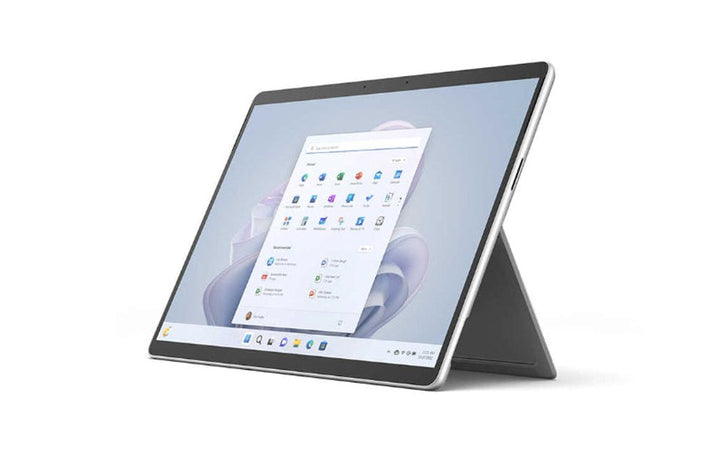


Microsoft Surface Pro 9 SQ3/8GB/128GB Platinum Windows 11 Pro
PRODUCT DESCRIPTION
Microsoft Surface Pro 9 with 5G (RS8-00011) - 1 Year Local Warranty
Surface Pro 9 with 5G — the Arm Model, and It Is a Cellular Device
This is the Surface Pro 9 with 5G (RS8-00011): the Arm-based model built on the Microsoft SQ 3 processor, with 8 GB of LPDDR4x memory and a 128 GB removable solid-state drive, in Platinum. Two things follow from that.
First, 5G is standard on this variant, not an option. Microsoft does not publish an SQ3 model without cellular — “with 5G” is part of the official product name. There is a nano SIM slot and eSIM support. Second, this is an Arm device rather than an x86 one, which is the real decision point below.
Nineteen Hours, and Windows Studio Effects
Microsoft publishes up to 19 hours of typical device usage for this variant, against 15.5 hours for the Intel models — the Arm silicon is the reason the 5G model is the longer-lasting one despite carrying a cellular radio. Microsoft’s caveat, in its own words: “Battery life varies significantly based on device configuration, usage, network and feature configuration, signal strength, settings, and other factors.” The testing was conducted in August 2022.
The SQ 3’s NPU also unlocks Windows Studio Effects — Eye Contact, Portrait Background Blur, Automatic Framing and Voice Focus — which Microsoft lists for this variant and not for the Intel models. For a device bought primarily for video calls from anywhere, that combination is the argument.
Read the Arm Compatibility Position Before You Commit
This is an Arm device, and that is a real buying decision rather than a footnote. Most mainstream software runs natively on Arm, and Windows emulates the rest — but drivers, anti-cheat, input method editors and some security software still need Arm64 builds. Read the compatibility section below before you commit, particularly if you depend on specialist peripherals or older line-of-business software.
Microsoft’s published position is genuinely good: Microsoft 365, Chrome, Zoom, Teams, WhatsApp, Spotify, Blender, DaVinci Resolve and Adobe Photoshop and Lightroom all run natively, and Microsoft states that “nearly 90% of total app usage is projected to come from native apps”, with x86 and x64 applications running under the Prism emulator and “most x64 applications expected to perform comparably to native apps under emulation”. The exceptions are specific and listed in the compatibility section below.
What Is Not in the Box, and What This Device Is Not
The keyboard and pen are not included. Microsoft’s published box contents are the tablet, the power supply, a Quick Start Guide and the safety and warranty documents — nothing else. The Surface Pro Signature Keyboard and the Surface Slim Pen 2 are separate purchases, and Microsoft notes that the Slim Pen 2 “does not come with a charger”. Budget for them: a Surface Pro without a keyboard is a tablet.
Surface Pro 9 is not a Copilot+ PC. Microsoft’s published Copilot+ requirement is a processor or SoC “capable of performing 40+ TOPS” alongside 16 GB of memory and 256 GB of storage, and neither Surface Pro 9 variant meets it — Microsoft’s own page listing which Surface devices are Copilot+ PCs places Surface Pro 9 under Windows 11 PCs instead. Do not buy this device expecting Recall or the other Copilot+ exclusive features.
Specification note. Two things to know about this model. First, every SQ3 configuration of Surface Pro 9 is officially the Surface Pro 9 with 5G — it is a cellular device with a nano SIM slot, and “with 5G” is part of Microsoft’s product name rather than an option. Second, this is an Arm device: most software runs natively or under emulation, but drivers, anti-cheat, input method editors and some security software need Arm64 builds — read the compatibility section before ordering. Also note that the keyboard and pen are not included, that there is no 3.5 mm headphone jack, that this variant has USB-C 3.2 and not Thunderbolt, and that Surface Pro 9 is not a Copilot+ PC. Microsoft’s consumer specification lists Windows 11 Home on ARM for this device; Windows 11 Pro is the Surface Pro 9 for Business configuration — confirm the edition with us before you order.
Microsoft Surface Pro 9 with 5G Datasheet — Technical Specifications
General
| Product Name | Microsoft Surface Pro 9 with 5G |
| Microsoft’s other names for it | Microsoft’s specification page labels this variant “Surface Pro 9 (SQ 3/5G)”; its update-history page uses both “Surface Pro 9 with 5G (SQ3 Processor)” and “Surface Pro 9 with ARM” |
| Part Number (SourceIT) | RS8-00011 |
| Processor | Microsoft SQ 3 processor, with a Neural Processing Unit (NPU) |
| Graphics | Microsoft SQ 3 Adreno 8CX Gen 3 |
| Architecture | Arm — not x86. See the compatibility section |
| Memory | 8 GB LPDDR4x |
| Storage | 128 GB removable solid-state drive |
| Colour | Platinum — the only colour Microsoft publishes for this variant |
| Operating System | Listed as Windows 11 Pro — see the Windows edition note in the status section |
| Manufacturer Warranty | 1-year limited hardware warranty, per Microsoft’s published specification |
| Local Warranty (Singapore) | Supplied by SourceIT with local support and a GST invoice |
Cellular
| 5G | Included and standard on this variant. Microsoft publishes NanoSIM and eSIM support, and 5G support |
| SIM | 1 × nano SIM slot, plus eSIM |
| mmWave | Microsoft states mmWave is US only, and that “5G not available in all areas”. Singapore deployments use sub-6 GHz |
| Satellite Navigation | GPS, GLONASS, Galileo and BeiDou |
Display
| Display | 13-inch PixelSense Flow Display |
| Resolution | 2880 × 1920 (267 PPI) |
| Aspect Ratio | 3:2 |
| Contrast Ratio | 1200:1 |
| Refresh Rate | Dynamic refresh rate up to 120 Hz |
| Touch | 10-point multi-touch |
| Glass | Corning Gorilla Glass 5 |
| Pen | Designed for Surface Slim Pen 2; supports the Microsoft Pen Protocol (MPP). Pen sold separately |
| HDR | Not published by Microsoft for this variant — Microsoft publishes Dolby Vision IQ on the Intel model only |
Ports and Wireless
| USB-C | 2 × USB-C 3.2. No Thunderbolt — Thunderbolt 4 is on the Intel models only |
| Surface Connect | 1 × Surface Connect port |
| Keyboard Port | Surface Keyboard port |
| SIM | 1 × nano SIM |
| Wi-Fi | Wi-Fi 6E, 802.11ax compatible |
| Bluetooth | Bluetooth Wireless 5.1 |
Cameras, Audio and Sensors
| Front Camera | Windows Hello face authentication camera, plus 1080p full HD video |
| Rear Camera | 10.0 MP autofocus, 1080p HD and 4K video |
| Audio | 2 W stereo speakers with Dolby Atmos |
| Microphones | Dual far-field studio microphones |
| Headphone Jack | None — Microsoft’s port list omits a 3.5 mm jack for both variants |
| Sensors | Accelerometer, gyroscope, magnetometer, ambient colour sensor |
| Windows Studio Effects | Eye Contact, Portrait Background Blur, Automatic Framing and Voice Focus — Microsoft lists these for this variant only, not for the Intel models |
Power, Physical and Security
| Battery Life | Up to 19 hours of typical device usage |
| Battery Capacity | 47.7 Wh nominal; 46.5 Wh minimum |
| Dimensions | 287 × 209 × 9.3 mm (11.3 × 8.2 × 0.37 in) |
| Weight | 883 g (1.95 lb) — Microsoft’s figure is stated with mmWave, and excludes keyboard and pen |
| Security | Microsoft Pluton; Windows Hello face sign-in. Microsoft lists Pluton for this variant, not “TPM 2.0” |
| NPU performance | Not published by Microsoft — Microsoft confirms an NPU but publishes no TOPS figure |
In the Box
| Included | Surface Pro 9 (SQ 3/5G), power supply, Quick Start Guide, safety and warranty documents, SIM card access tool |
| Keyboard | Not included — the Surface Pro Signature Keyboard is sold separately |
| Pen | Not included — the Surface Slim Pen 2 is sold separately, and does not come with a charger |
What Microsoft Does Not Publish for This Product
The following are commonly asked about but are not stated on any current official Microsoft source for this product, so SourceIT does not quote them: a Singapore-specific warranty duration, a Singapore price for any Surface Pro 9 configuration, a formal end-of-sale or discontinuation notice, a TOPS figure for the SQ 3 neural processing unit, Dolby Vision IQ support for this variant and any Hyper-V or virtualisation limitation on Arm Surface devices. We would rather leave a field blank than print a figure we cannot substantiate.
Product Status, Availability and Warranty
This is a superseded model, and we would rather say so than let you find out later. Surface Pro 9 launched in October 2022. Microsoft’s own Surface for Business site describes it as “a legacy 2-in-1 device” against newer models, its consumer “Tech specs” page has been withdrawn, and every Microsoft Store route for it shows the product as out of stock or with no configurations available. Microsoft has published no formal end-of-sale notice, so “legacy and out of stock at Microsoft” is the accurate description rather than “discontinued”.
Check the Windows edition against the SKU you are quoted. Microsoft’s consumer specification for Surface Pro 9 lists Windows 11 Home (and “Windows 11 Home on ARM” for the 5G model); Windows 11 Pro is what Microsoft ships on the Surface Pro 9 for Business configurations. Both are genuine Microsoft configurations, but they are different SKUs. Ask us to confirm the edition in writing before you order.
Microsoft uses several names for the same two devices. Its specification page labels them “Surface Pro 9 (Intel/Wifi)” and “Surface Pro 9 (SQ 3/5G)”; its update-history page uses “Surface Pro 9 with Intel”, “Surface Pro 9 with 5G (SQ3 Processor)” and “Surface Pro 9 with ARM”. They are all one of these two machines. Match on the part number rather than the name.
Microsoft publishes a full service guide and a self-repair programme for this device. The components it lists as replaceable are the kickstand, display, Surface Connect charging port, back cover, speaker, battery, thermal module, cameras, camera deck, power and volume button, SSD door, the removable solid-state drive and the motherboard. Microsoft’s condition is that “components can be replaced on-site by a skilled technician following Microsoft’s Service Guide” — this is not a user-upgradeable machine, but it is a serviceable one, which matters on a fleet.
Contact SourceIT for the current stock position and lead time before you raise a purchase order.
Published Lifecycle Dates
| Released | 25 October 2022 |
| Driver and firmware support until | 25 October 2028 |
| Microsoft’s policy | “For devices released on and after January 1, 2021: Surface devices receive driver and firmware updates for at least six years from when the device was first released.” |
| Does the date differ by variant? | No. Microsoft publishes a single lifecycle row covering Surface Pro 9, with the same end-of-servicing date for the Intel and the 5G models |
| Still receiving updates? | Yes — Microsoft’s Surface Pro 9 update history page is live and carries a separate tab for the 5G (SQ3) model. Microsoft publishes no last-update date for that tab, so none is stated here; its Intel tab shows updates through August 2026 |
Warranty and Support Position
Microsoft’s published specification for Surface Pro 9 states a 1-year limited hardware warranty. Be aware of exactly what that is and is not: it is Microsoft’s global specification-sheet figure. Microsoft publishes no Singapore-specific warranty duration — its Singapore warranty page links to an Asia-Pacific Limited Hardware Warranty document rather than stating a term on the page. We therefore quote the specification-sheet term and attribute it, rather than presenting it as a confirmed Singapore term. Microsoft separately publishes extended cover for Singapore — Microsoft Complete for Devices, Complete for Business and Complete for Business Plus, and Extended Hardware Service — as products distinct from the base warranty; Microsoft does not publish their durations, so none is quoted here. SourceIT supplies this device with local Singapore support and a GST invoice; ask us to confirm the warranty position in writing before you order.
SourceIT supplies this product in Singapore with a one-year local warranty, which is the term stated in the heading of this listing. That term is SourceIT's, not a figure quoted from Microsoft.
Compatibility, Setup and Software
What runs natively. Microsoft names Microsoft 365 (Teams, Word, Excel, PowerPoint, Outlook, OneDrive, OneNote), Chrome, Spotify, Zoom, WhatsApp, Blender, the Affinity suite, DaVinci Resolve, and Adobe Photoshop and Lightroom, and states that “nearly 90% of total app usage is projected to come from native apps”.
What runs under emulation. x86 and x64 Win32 applications run through Microsoft’s Prism emulator, and Microsoft states that “most x64 applications are expected to perform comparably to native apps under emulation”.
The published limitations, in Microsoft’s words — these are the ones that bite. Drivers: “Drivers for hardware, games, and apps must be designed for Arm-based devices. Most common drivers are now available, but specialized hardware or older peripherals might require verification for Arm64 compatibility.” Kernel mode: “Emulation only supports user mode code and doesn’t support drivers. Any kernel mode components must be compiled as Arm64.” Games: those relying “on OpenGL versions greater than 3.3 or on ‘anti-cheat’ drivers not updated for Arm might not work”. Customisation apps: input method editors and cloud storage clients “might encounter issues unless optimized for Arm64”. Antivirus: “compatibility has improved but can vary”. And Windows Fax and Scan is “not available on Arm-based devices”.
Practical advice: if your users depend on a specialist printer, scanner, label writer, dongle or line-of-business client, check for an Arm64 driver before you order a fleet. Microsoft publishes no Hyper-V or virtualisation limitation for Arm Surface devices, so we state none — but we would confirm it for your specific workload rather than assume.
5G coverage: Microsoft states “5G not available in all areas, mmWave in US only”. A Singapore deployment uses sub-6 GHz, so do not plan around mmWave throughput figures.
Official Microsoft Sources & Downloads
- Surface Pro 9 features and specs — Microsoft support (the surviving specification source)
- Surface driver and firmware lifecycle — Microsoft Learn
- Surface Pro 9 update history — Microsoft support
- Copilot+ PCs and Windows 11 PCs from Surface — Microsoft support
- Self-repair information for your Surface device — Microsoft support
- Surface warranty and protection plan terms, Singapore — Microsoft support
- Arm-based Surface devices FAQ — Microsoft Learn
- How x86 and x64 applications run on Arm — Microsoft Learn
Microsoft has withdrawn the consumer Tech specs page for Surface Pro 9, so the support documentation above is the surviving official specification source. Supplied by SourceIT in Singapore with a GST invoice and local support. For a written quotation, current stock position or delivery lead time, contact our team.
Frequently Asked Questions — Microsoft Surface Pro 9 with 5G
Is the keyboard included?
No. Microsoft’s published box contents are the tablet, the power supply, a Quick Start Guide and the safety and warranty documents. The Surface Pro Signature Keyboard is a separate purchase, as is the Surface Slim Pen 2 — which Microsoft notes does not come with a charger. Ask us to quote them together.
Does this model have 5G?
Yes, and it is standard rather than optional. Every SQ3 configuration of Surface Pro 9 is officially the “Surface Pro 9 with 5G”. There is a nano SIM slot and eSIM support. Note Microsoft’s caveat that “5G not available in all areas, mmWave in US only” — Singapore uses sub-6 GHz.
Will my software run on it?
Most will. Microsoft states nearly 90% of total app usage is projected to come from native Arm apps, and x86 and x64 applications run under the Prism emulator with most x64 apps expected to perform comparably. The exceptions Microsoft publishes are drivers for specialist or older peripherals, kernel-mode components, games relying on OpenGL above 3.3 or on anti-cheat drivers, input method editors, cloud storage clients and some antivirus. Windows Fax and Scan is not available on Arm. Check your specialist peripherals before ordering a fleet.
Does it have Thunderbolt?
No. The 5G model has two USB-C 3.2 ports. Thunderbolt 4 is on the Intel models only. If you need single-cable docking or an external GPU, buy the Intel variant.
Does it have a headphone jack?
No. Microsoft’s port list for both variants omits a 3.5 mm jack. Use USB-C or Bluetooth audio.
How long will Microsoft support it?
Microsoft publishes driver and firmware support until 25 October 2028, six years from its 25 October 2022 release. The same date covers both the Intel and the 5G variants — Microsoft publishes a single lifecycle row for Surface Pro 9.
Is this the current Surface Pro?
No, and we will not pretend otherwise. Surface Pro 9 launched in 2022 and Microsoft describes it as a legacy device, has withdrawn its consumer Tech specs page, and shows it as out of stock on its own store. It is still supported to October 2028. If you want a current model, ask us and we will quote one.
Is it a Copilot+ PC?
No. Microsoft’s published Copilot+ requirement is a processor or SoC capable of 40+ TOPS with 16 GB of memory and 256 GB of storage, and this device does not meet it — Microsoft confirms an NPU on the SQ 3 but publishes no TOPS figure for it, and its own list places Surface Pro 9 with 5G under Windows 11 PCs rather than Copilot+ PCs. Do not expect Recall or the other Copilot+ exclusive features.
What warranty applies in Singapore?
Microsoft’s published specification states a 1-year limited hardware warranty. Microsoft publishes no Singapore-specific duration — its Singapore warranty page points to an Asia-Pacific warranty document instead — so we quote the specification-sheet term and attribute it rather than presenting it as a confirmed Singapore term. SourceIT supplies the device with local support and a GST invoice. SourceIT supplies this product in Singapore with a one-year local warranty, which is the term stated in the heading of this listing. That term is SourceIT's, not a figure quoted from Microsoft.


