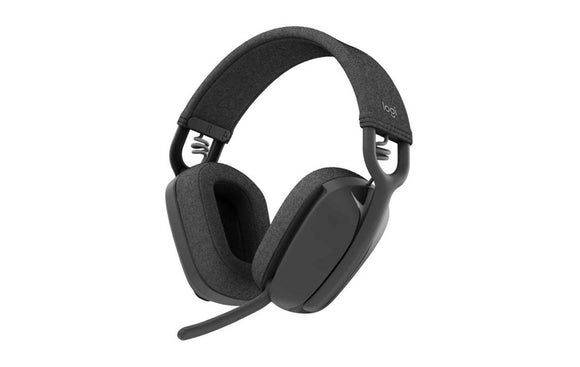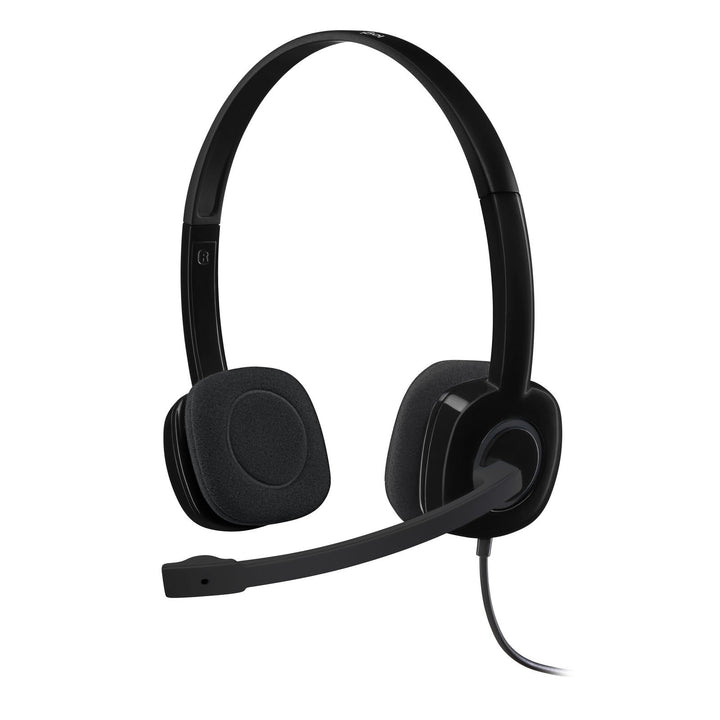

Logitech H151 Stereo Wired Headset Single 3.5mm Jack
PRODUCT DESCRIPTION
Logitech H151 Stereo Wired Headset Single 3.5mm Jack (981-000587) - 2 Years Local Warranty
Logitech H151 Stereo Headset with In-Line Volume and Mute Controls
The Logitech H151 (981-000587) pairs a single 3.5 mm jack with in-line volume and mute controls, so users can silence themselves instantly without hunting for the mute button in Teams or Zoom. It is a practical, low-cost standard for Singapore offices, schools and hybrid workers who move the same headset between a work laptop, a personal tablet and a phone.
Noise-Cancelling Rotating Boom Microphone
A rotating boom microphone with noise cancelling keeps speech clear in open-plan offices and shared study spaces. Microphone response runs 100 Hz to 6,500 Hz with -44 dBV/Pa ±2.5 dB sensitivity, tuned for the voice band rather than music recording. The boom swings through a wide arc so the headset can be worn with the microphone on either side, or rotated up when it is not in use.
Stereo Sound with 22 Ohm Drivers
The H151 delivers a 20 Hz to 20 kHz headphone frequency response at 122 dB ±3 dB sensitivity into a 22 ohm input impedance, which makes it easy to drive from phones and low-power laptop audio outputs without sounding thin. Over-the-ear cups with padding and an adjustable headband keep the fit stable across back-to-back meetings and lessons.
Universal 3.5 mm Connectivity, No Drivers Required
One 4-pole 3.5 mm plug covers Windows, macOS, ChromeOS, Linux, iOS and Android, with a 1.8 m cable that suits desk and laptop use. There is no software to install and no license to manage, which keeps the IT overhead at zero when deploying across a large team or a classroom.
Logitech H151 Datasheet — Technical Specifications
General
| Model | Logitech H151 Stereo Headset |
| Part Number | 981-000587 |
| Product Type | Wired over-the-ear stereo headset |
| Wearing Style | Over-the-head adjustable headband, over-the-ear cups with padding |
| Warranty | 2 Years Local Warranty (Singapore) |
Audio
| Headphone Frequency Response | 20 Hz – 20 kHz |
| Headphone Sensitivity | 122 dB ±3 dB |
| Input Impedance | 22 ohm |
| Microphone Type | Rotating boom |
| Microphone Noise Cancelling | Yes |
| Microphone Frequency Response | 100 Hz – 6,500 Hz |
| Microphone Sensitivity | -44 dBV/Pa ±2.5 dB |
Connectivity
| Connector | Single 3.5 mm jack (combined audio and microphone) |
| Cable Length | 1.8 m (5.90 ft) |
| In-Line Controls | Volume, microphone mute |
| Power | Bus powered via the host device — no external power required |
Design & Power
| Dimensions (H × W × D) | 60 mm × 145 mm × 200 mm |
| Weight | 80 g |
| Headband Padding | No |
| Ear Cup Padding | Yes |
| Colour | Black |
Compatibility & Software Support
The Logitech H151 is an analogue headset on a single 3.5 mm jack and works with any device that has a 4-pole 3.5 mm headset port.
Operating System and Platform Support
| Windows | Windows Vista, Windows 7, Windows 8 / 8.1 and later |
| macOS | Mac OS X 10.5 or later |
| ChromeOS | Supported |
| Linux | Linux Kernel 2.6 or later |
| Mobile | iOS and Android devices with a 3.5 mm headset port |
Meeting and Softphone Applications
The H151 works with Microsoft Teams, Zoom, Google Meet, Webex and Skype for Business as the host device's default audio input and output. Note that the in-line mute switch cuts the microphone at the headset; it does not change the mute state shown inside the meeting application, so remember to check both when you unmute. Logitech does not publish a platform certification for the H151, so it is specified as compatible rather than certified.
Software
No drivers or software are required. The H151 is not managed by Logitech Sync, Logi Options+ or Logi Tune.
The headset is a standard plug-and-play audio device and requires no drivers or additional software to make and receive calls.
Package Contents & H-Series Ordering Information
In the Box
- Logitech H151 Stereo Headset
- User documentation
Logitech H-Series Wired Headsets at SourceIT
Logitech H151 Stereo Headset — 981-000587 (this listing)
| Model | Part Number | Notes |
| H111 Stereo Headset | 981-000588 | 3.5 mm single jack, 73.2 g |
| H151 Stereo Headset | 981-000587 | 3.5 mm single jack, in-line controls |
| H340 USB Headset | 981-000477 | USB-A, no in-line controls |
| H540 USB Headset | 981-000482 | USB-A, on-earcup controls (clearance — while stocks last) |
| H390 USB Headset | 981-000485 | USB-A, in-line controls, leatherette pads |
| H570e Stereo Business Headset | 981-000574 | USB-A, dual noise-cancelling mics |
| H650e Business Headset | 981-000545 | USB-A, 32 mm driver with Dynamic EQ |
Datasheet & Downloads
Frequently Asked Questions — Logitech H151
What do the in-line controls on the H151 do?
The in-line module on the cable carries a volume adjustment and a microphone mute switch. Mute acts at the headset itself, which is useful when you need to cut your microphone immediately. Because it is a hardware mute, the meeting application will not show you as muted — check both if a colleague says they cannot hear you.
How is the H151 different from the H111?
The Logitech H111 has no in-line controls and a longer 2.35 m cable; the H151 adds volume and mute on the cable with a 1.8 m cable. The H151 also has a lower 22 ohm impedance and higher rated sensitivity, which makes it a little easier to drive loudly from a phone or tablet.
Should I choose the H151 or a USB headset like the H340?
Choose the H151 if users need one headset that also works with phones and tablets over 3.5 mm. Choose the Logitech H340 if the headset will only ever be used with computers — USB carries digital audio, so sound quality does not depend on the quality of the laptop's analogue audio circuitry, and it avoids the mismatched-jack problems that occur on some docking stations.
Is the H151 suitable for students and e-learning?
Yes. It is one of the most commonly deployed headsets in Singapore schools because it works with school Chromebooks, personal tablets and home PCs from the same single jack, needs no software, and is inexpensive enough to replace if damaged.
Does the H151 need a separate microphone port?
No. It uses a single 4-pole plug that carries audio and microphone together. If you are connecting to an older desktop that has separate green headphone and pink microphone sockets, you will need a 3.5 mm splitter adapter, which is not included.
Does the H151 have active noise cancellation for the wearer?
No. The noise cancelling on the H151 applies to the microphone, reducing background noise picked up from the room so the far end hears your voice more clearly. It does not cancel noise in what you hear. For active noise cancellation on the listening side, look at the Logitech Zone Wireless 2 family.
Does this headset come with a Singapore warranty?
Yes. Every H151 sold by SourceIT comes with 2 years local Singapore warranty and a GST invoice.