

Logitech H111 Basic Stereo Wired Headset Single 3.5mm Jack
PRODUCT DESCRIPTION
Logitech H111 Basic Stereo Wired Headset Single 3.5mm Jack (981-000588) - 2 Years Local Warranty
Logitech H111 Stereo Headset for Everyday Calls, Classrooms and Contact Centres
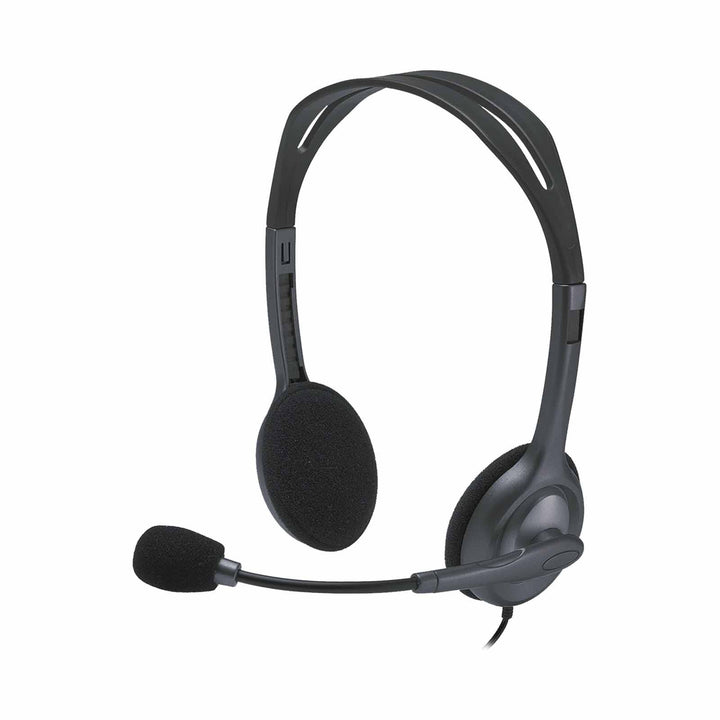
The Logitech H111 (981-000588) is a lightweight on-ear stereo headset built for volume deployment across Singapore offices, schools and helpdesks. A single 3.5 mm jack carries both audio and microphone, so one headset covers laptops, desktops, tablets and smartphones with no adapters and no drivers. At 73.2 g it is one of the lightest business headsets Logitech makes, which matters when staff wear it for a full shift.
Noise-Cancelling Rotating Boom Microphone
The H111 uses a rotating boom microphone with noise cancelling to keep your voice intelligible in open-plan offices and shared classrooms. Microphone pickup runs from 100 Hz to 16,000 Hz, and microphone sensitivity is rated at -58 dBV/µBar, -38 dBV/Pa ±4 dB. Because the boom rotates through a full arc, the same headset can be worn with the mic on the left or the right, or swung up out of the way when you are only listening.
Full-Range Stereo Audio for Calls and E-Learning
Stereo drivers deliver a 20 Hz to 20 kHz frequency response with 100 dB ±3 dB sensitivity and a 32 ohm input impedance, which is enough range for conference calls, recorded training content and background music alike. Padded ear cups and an adjustable over-the-head band with left and right indicators keep the fit consistent across a shared pool of devices.
A Long 2.35 m Cable for Desks, Labs and Training Rooms
The H111 ships with an unusually generous 2.35 m (7.7 ft) cable, which is well suited to computer labs, training rooms and desks where the CPU sits on the floor. Combined with universal 3.5 mm connectivity and cross-platform support for Windows, macOS, ChromeOS, Linux, iOS and Android, it is a simple standard to issue in bulk and to keep as a spare in the store cupboard.
Logitech H111 Datasheet — Technical Specifications
General
| Model | Logitech H111 Stereo Headset |
| Logitech Model Number | A-00021 |
| Part Number | 981-000588 |
| Product Type | Wired on-ear stereo headset |
| Wearing Style | Over-the-head, adjustable headband, left/right indication |
| Warranty | 2 Years Local Warranty (Singapore) |
Audio
| Headphone Frequency Response | 20 Hz – 20 kHz |
| Headphone Sensitivity | 100 dB ±3 dB |
| Input Impedance | 32 ohm |
| Microphone Type | Rotating boom |
| Microphone Noise Cancelling | Yes |
| Microphone Frequency Response | 100 Hz – 16,000 Hz |
| Microphone Sensitivity | -58 dBV/µBar, -38 dBV/Pa ±4 dB |
Connectivity
| Connector | Single 3.5 mm jack (combined audio and microphone) |
| Cable Length | 2.35 m (7.7 ft) |
| In-Line Controls | None |
| Power | Bus powered via the host device — no external power required |
Design & Power
| Dimensions (H × W × D) | 160 mm × 210 mm × 50 mm |
| Weight | 73.2 g |
| Ear Cup Padding | Yes |
| Headband Padding | No |
| Colour | Black |
Compatibility & Software Support
The Logitech H111 connects over a single 3.5 mm jack and is recognised as a standard analogue headset, so it works with any device that has a 4-pole 3.5 mm headset port.
Operating System and Platform Support
| Windows | Windows Vista through Windows 10 and later |
| macOS | Mac OS X 10.5 or later |
| ChromeOS | Supported |
| Linux | Supported |
| Mobile | iOS and Android devices with a 3.5 mm headset port |
Meeting and Softphone Applications
Because the H111 presents itself as a plain analogue headset, it works with Microsoft Teams, Zoom, Google Meet, Webex, Skype for Business and any other softphone or conferencing application that uses the host device's default audio input and output. Logitech does not publish a device certification for the H111 with these platforms, so it should be specified as a compatible headset rather than a certified one.
Software
No software, drivers or firmware updates are required. The H111 is not managed by Logitech Sync, Logi Options+ or Logi Tune.
The headset is a standard plug-and-play audio device and requires no drivers or additional software to make and receive calls.
Package Contents & H-Series Ordering Information
In the Box
- Logitech H111 Stereo Headset
- User documentation
Logitech H-Series Wired Headsets at SourceIT
Logitech H111 Stereo Headset — 981-000588 (this listing)
| Model | Part Number | Notes |
| H111 Stereo Headset | 981-000588 | 3.5 mm single jack, 73.2 g |
| H151 Stereo Headset | 981-000587 | 3.5 mm single jack, in-line controls |
| H340 USB Headset | 981-000477 | USB-A, no in-line controls |
| H540 USB Headset | 981-000482 | USB-A, on-earcup controls (clearance — while stocks last) |
| H390 USB Headset | 981-000485 | USB-A, in-line controls, leatherette pads |
| H570e Stereo Business Headset | 981-000574 | USB-A, dual noise-cancelling mics |
| H650e Business Headset | 981-000545 | USB-A, 32 mm driver with Dynamic EQ |
Datasheet & Downloads
Frequently Asked Questions — Logitech H111
Does the H111 work with my laptop if it only has one 3.5 mm port?
Yes — that is exactly what it is designed for. The H111 uses a single 4-pole 3.5 mm jack that carries headphone audio and microphone on the same plug, so it fits the single combo headset port found on most modern laptops, Chromebooks, tablets and smartphones. No splitter or adapter is needed.
What is the difference between the H111 and the H151?
Both use a single 3.5 mm jack, but the Logitech H151 adds in-line volume and mute controls on the cable, while the H111 has no controls. The H111 has the longer cable at 2.35 m against 1.8 m on the H151, and is slightly lighter at 73.2 g against 80 g. Choose the H111 for computer labs and desks where reach matters; choose the H151 when users want to mute without touching the software.
Is the H111 suitable for a call centre or helpdesk?
It is a workable entry-level option for light call volumes, and its low cost and low weight make it easy to deploy in numbers. For sustained contact-centre use we would point you at the Logitech H570e or the H650e, which use digital USB audio, dual noise-cancelling microphones and in-line call controls designed for all-day use.
Do I need to install any software or drivers?
No. The H111 is a passive analogue headset. Plug it into the 3.5 mm port and select it as the input and output device in Windows, macOS or ChromeOS if your machine does not switch automatically. There is nothing to install, update or license.
Can I use the H111 with a mobile phone or tablet?
Yes. Any iOS or Android phone or tablet with a 3.5 mm headset port will work. Devices that have dropped the headphone jack will need a USB-C or Lightning to 3.5 mm adapter, which is not included.
Are replacement ear pads available for the H111?
Logitech does not sell replacement ear cushions for the H111 as a separate part in Singapore. If spare parts availability matters for your deployment, the H570e is the better choice — SourceIT stocks H570e replacement ear pad covers (952-000064) as a serviceable item.
Does this headset come with a Singapore warranty?
Yes. Every H111 sold by SourceIT comes with 2 years local Singapore warranty and a GST invoice.