
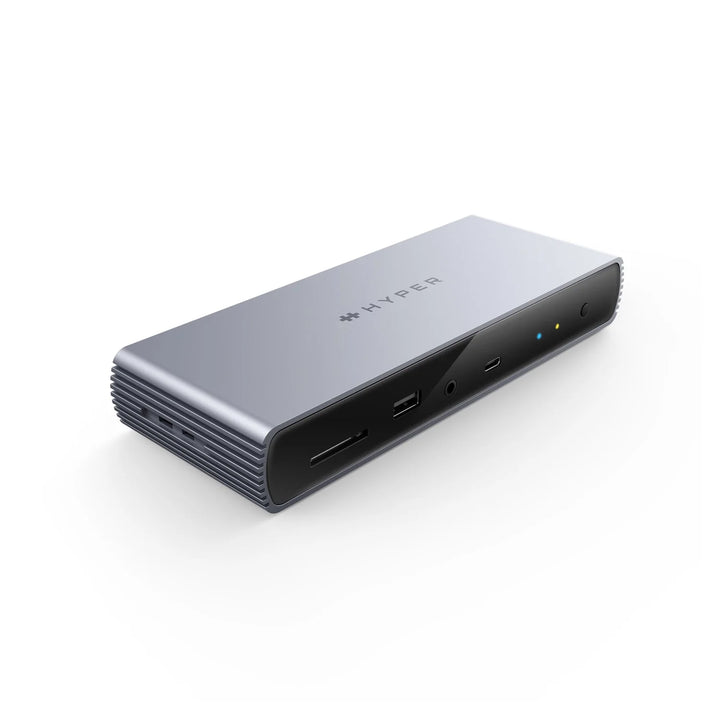


HyperDrive Thunderbolt 4 Docking Station (2 Downstream Ports)
Prices in SGD, excluding 9% GST.
PRODUCT DESCRIPTION
HyperDrive Thunderbolt 4 Docking Station (2 Downstream Ports) (HDTB4D-US-50) - 2 Years Local Warranty
One Thunderbolt cable to a full desk setup
Connect a laptop over a single Thunderbolt 4 cable and get 11 ports: two extra Thunderbolt 4 ports at 40Gbps, HDMI 2.1, four 10Gbps USB-A ports, 2.5 Gigabit Ethernet, an SD UHS-II reader and a 3.5 mm audio jack, while the laptop charges at up to 96W.
High-resolution displays for creative and engineering teams
Drive a single display at up to 8K 60Hz or 4K 120Hz, or two displays at up to 6K 60Hz each, using HDMI and the Thunderbolt ports.
Faster wired networking and media offload
2.5 Gigabit Ethernet gives hot-desk and studio users a stable wired link, and the UHS-II card reader speeds up camera card transfers.
Hyper HDTB4D-US-50 Datasheet — Technical Specifications
General
| Product Name | HyperDrive Thunderbolt 4 Docking Station (2 Downstream Ports) |
| Part Number (SKU) | HDTB4D-US-50 |
| Brand | Hyper (HyperDrive) |
| Total Ports | 11 |
| Local Warranty (Singapore) | 2 Years |
Ports
| Host (upstream) | 1x Thunderbolt 4, 40Gbps, up to 96W Power Delivery to the laptop |
| Thunderbolt 4 downstream | 2x Thunderbolt 4, 40Gbps, 15W each |
| Video | 1x HDMI 2.1 |
| USB-A | 1x USB-A 10Gbps (10W) + 3x USB-A 10Gbps (4.5W) |
| Card Reader | 1x SD UHS-II, up to 312MB/s |
| Network | 1x 2.5 Gigabit Ethernet |
| Audio | 1x 3.5 mm audio combo jack |
| Power Input | DC power input |
Display Support
| Single Display | Up to 8K 60Hz or 4K 120Hz |
| Dual Display | Up to 6K 60Hz on each display, via HDMI and/or Thunderbolt |
| Extended Displays | Up to 2 |
| Mac Note | Dual external displays need a MacBook with an M-series Pro or Max chip; base M1–M4 MacBooks support one external display |
Dimensions & Weight
| Dimensions | 199.5 x 74.8 x 31.1 mm |
| Weight | 405.4 g |
Compatibility
Host connection: laptops with Thunderbolt 4 or Thunderbolt 3, USB4, or USB-C with DisplayPort Alt Mode. Full Thunderbolt features need a Thunderbolt or USB4 host.
Operating systems: macOS 11 Big Sur or later, Windows 10 or later, the latest ChromeOS and iPadOS. Not supported: Windows 7/8, Linux and Android.
Apple devices listed by Hyper: MacBook Pro (2016 or later), MacBook Air (2018 or later), iPad Pro (2018 or later), iPad Air (2020 or later).
Dual displays on Mac: base M1, M2, M3 and M4 MacBooks support only one external display; MacBooks with Pro or Max chips support two.
Package Contents & Ordering Information
Contact sales@sourceit.com.sg to confirm the full box contents for your order.
Ships from SourceIT Pte Ltd with a GST invoice and local Singapore warranty. Email sales@sourceit.com.sg for volume pricing.
Datasheet & Downloads
Official Hyper product page for HyperDrive Thunderbolt 4 Docking Station
Need a PDF sent directly? Email sales@sourceit.com.sg quoting HDTB4D-US-50.
Frequently Asked Questions — Hyper HDTB4D-US-50
How much power does it deliver to my laptop?
Up to 96W through the Thunderbolt 4 host port.
How many monitors can I connect?
Up to two extended displays: one at up to 8K 60Hz or 4K 120Hz, or two at up to 6K 60Hz each.
Will it run two monitors on my MacBook Air?
Base M1–M4 MacBooks support one external display. Dual displays need an M-series Pro or Max MacBook.
Does it work with USB-C laptops that are not Thunderbolt?
Hyper lists USB4 and USB-C with DisplayPort Alt Mode hosts as compatible; Thunderbolt-only features need a Thunderbolt or USB4 host.
Is Linux supported?
No. Hyper lists macOS 11+, Windows 10+, ChromeOS and iPadOS.
What warranty and invoice do I get?
A 2-year local warranty in Singapore, with a GST invoice from SourceIT Pte Ltd.