

HP ScanJet Enterprise Flow N6600 fnw1
PRODUCT DESCRIPTION
HP ScanJet Enterprise Flow N6600 fnw1 (20G08A) - 1 Year Local Warranty
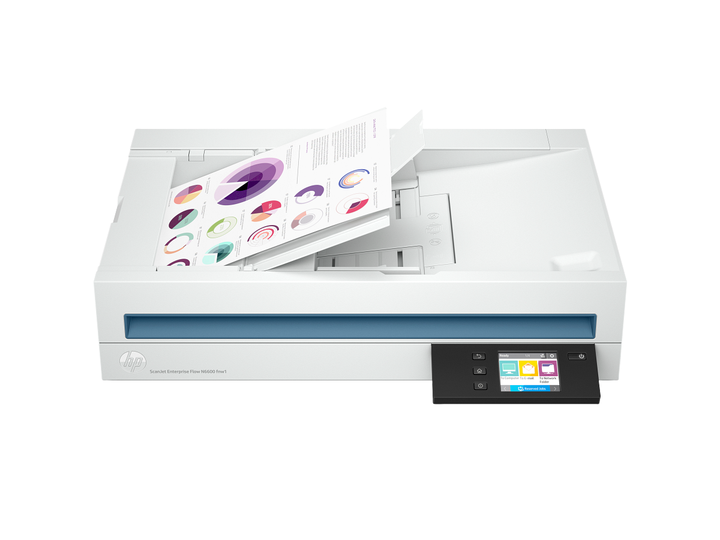
The HP ScanJet Enterprise Flow N6600 fnw1 (20G08A) is an A4 networked flatbed and ADF document scanner (Ethernet, Wi-Fi). It is supplied by SourceIT as a genuine Singapore unit with 1 year local HP warranty.
Fast, networked scanning
Scan up to 50 ppm / 100 ipm, with Gigabit Ethernet, Wi-Fi and Wi-Fi Direct for the whole team.
100-sheet ADF, two-sided
Single-pass duplex scanning from a 100-sheet automatic document feeder, plus a flatbed.
Up to 8,000 pages a day
Designed for high daily volumes; HP EveryPage multi-feed detection helps avoid misfeeds.
Intelligent workflows
Editing tools and automated document workflows run from the 2.8-inch touchscreen.
Ideal For
Offices, finance and HR teams, clinics and document-heavy departments in Singapore that need reliable, fast digitisation of paper records. Supplied by SourceIT with local Singapore warranty, GST invoice and corporate or project pricing on request.
ScanJet Enterprise Flow N6600 fnw1 Datasheet — Technical Specifications
General
| Model | ScanJet Enterprise Flow N6600 fnw1 |
| Official Product Name | HP ScanJet Enterprise Flow N6600 fnw1 |
| HP Product Number | 20G08A |
| Brand | HP |
| Warranty | 1 Year Local Warranty (Singapore) - Next Business Day Exchange |
| Scanner type | ADF; CIS scanning technology; Flatbed |
| Duty cycle (daily) | Recommended daily duty cycle: 8000 pages (ADF) |
| Processor speed | 666 MHz |
| Memory | 1 GB |
| Display | 2.8-in (7.11-cm) Touchscreen |
| Control panel | 2.8-in (7.11-cm) Touchscreen, Buttons (Power, Back, Home, Help) |
| Security management | Power button to on/off |
Scan
| Digital sending standard features | Send to email (Store up to 50 e-mails); Send to network folder; Send to PC |
| Digital sending optional features | Send to email; Send to network folder; Send to PC |
| Scan resolution, optical | Up to 600 dpi (color and mono, ADF); Up to 1200 dpi (color and mono, flatbed) |
| Scan resolution, hardware | Up to 600 x 600 dpi (color and mono, ADF); Up to 1200 x 1200 dpi (color and mono, flatbed) |
| Enhanced scanning resolution | Up to 1200 dpi |
| Bit depth | 24-bit (external), 48-bit (internal) |
| Scan size, maximum | 216 x 356 mm |
| Scan file format | BMP; CSV; Excel (XLS); Excel ( XLSX); JPEG; PDF; PDF/A; RTF; Searchable PDF; TIFF; TXT; Word (DOC); Word (DOCX); XML |
| Scan input modes | Scan front-panel function : Scan to Computer, Scan to E-mail, Scan to Network Folder, Scan to Share Folder, Scan to USB Drive and Everyday Scan. HP Scan in Win OS, HP Easy Scan/ICA in Mac OS and THIRD parties applications via TWAIN. |
| Color scanning | Yes |
| Levels of grayscale | 256 |
| Image scaling or enlargement range | Will not perform any arbitrary scaling |
| Scan technology | ADF; Flatbed; Contact Image Sensor (CIS) |
| Output resolution dpi settings | 75; 150; 200; 240; 300; 400; 500; 600; 1200 ppi |
| Light source (scanning) | Light Emitting Diode (LED) |
| Scanner advanced features | One pass duplex scanning; Multi-feed detection sensor; Configurable Scan shortcuts with HP Scan Premium Software: OCR; Auto exposure; Auto threshold; Auto detect colour; Background smooth/removal; Auto detect size; Straighten content; Enhance content; Auto orient; Multicolour dropout; Edge erase; Blank page options: Delete Blank Page, Blank Page Detection Sensitivity, Zonal Blank Detect; Merge pages; Document separation options: Zonal Text Separation, Barcode Separation, Blank Page Separation, Detect All/ Exclude All Edges Evenly/Exclude Edges Specifically, HP Separator Page Separation, Barcode Settings for Doc Separation, Any Format/Specific Format, Barcode Value, Delete Barcode Separator; Auto Feed; Show Viewer After Scan and Post Scan Operations are: Mark the image for Deletion, Rotate option, Move Left/Right, Create/Delete New Selection, Save as Scan Area, Manual Straighten option, Drag and Crop, Undo Options, image - Basic Zoom Slider, Open in Zoom Window (Zoom, Crop, Rotate); Background Clean-up options: Clean-up Background, Remove: make white, Smooth, make consistent, Remove Holes; Multi-Streaming; Multizone Selection for Zonal OCR, Barcode and QR Code; Multizone options: Ability to select Multiple Zones for OCR/Barcode, File Naming, Folder Naming, Document separation, Capture Metadata; Digital Stamp; PDF options: PDF Security Settings (Applicable for PDF and Searchable PDF), Password Security & Document Permission Settings, PDF – iHQC compression, File Size/Quality Slider, TIFF Compression Options: for Gray or Color: Uncompressed/LZW/Jpeg-Tiff, for BW: Uncompressed/LZW/Tiff G3/Tiff G4; File Name Options: Base Name, Date, Time, Batch Counter, Document Counter, Barcode Value, Zonal Text, File name sequence Settings, If File name already exists Actions - Overwrite/Append Date Time Stamp/Prompt for File Name, Intelligent File Naming; Destinations options: Email (Mail Clients, Save Local Copy Option, Local or NW), Folder, Save Folder path, Show Save as Dialog Box, After Saving the File(s) action, Printer/Fax, Send To multiple Destinations, Custom Destinations, Sub Folder Name by Date of Scan, by Time of Scan, Plugins available if not already included: SMTP, SFTP, Box and Evernote, SharePoint, SharePoint365, Google Drive, Dropbox, OneDrive, One Drive for Business and more..; XML and PDF Metadata; Enable Book Scan (Flatbed); Intelligent Document Classification; Manual Redaction; Vertical Streak Removal/Detection; Multi Document Scanning; Enable Desktop Icons creation for Scan Profiles/Shortcuts; Shortcut Management: Create new Scan Shortcut, Delete, Rename, Move Up/Down, Save/Undo, Restore Defaults-Factory Settings, Import/Export Shortcuts, retrieve shortcuts from Scanner without accessing the software on the PC; Configurable Scan shortcuts as standalone (using only the firmware of the scanner) without using the HP Scan Software: Scan to Computer, E-mail, Network Folder, SharePoint, Scan to USB Drive. |
ADF
| Automatic document feeder scan speed | Up to 50 ppm/100 ipm (b&w, gray and color, 300 dpi) |
| Automatic document feeder scan speed | Up to 50 ppm/100 ipm (b&w, color, gray scale, 300 dpi) |
| Scan size (ADF), maximum | 216 x 5362 mm |
| Scan size (ADF), minimum | 89 x 148 mm |
| Automatic document feeder capacity | Standard, 100 sheets |
| Duplex ADF scanning | Yes |
| Scanning options (ADF) | Single-pass Duplex scanning |
| Multifeed detection | Yes |
Paper Handling
| Document weight ADF (maximum) | 120 g/m² |
| Media size (ADF) | Letter; Legal; Executive; A4; A5; A6; B5; B5 (JIS) |
| Media types | Paper (banner, inkjet, photo, plain), envelopes, labels, cards (greeting, index) |
| Media weights, supported ADF | 45 to 120 g/m² |
Connectivity
| Connectivity, standard | Ethernet 10/100/1000 Base-T, USB 3.0, WiFi 802.11 b/g/n, WiFi Direct |
| Network protocols, supported | Via built-in networking solution: TCP/IP, IPv4, IPv6; Web Services; Discovery: Bonjour, Web Services Discovery; IP Config: IPv4 (DHCP, Manual), IPv6 (DHCPv6) ARP; ICMP; IGMP; UDP; TCP; DHCP; APIPA; DNS; mDNS; LLMNR; WSD; WS-Scan; SNTP; SMB; SNMP; FTP; SFTP; SMTP; HTTP Server Part; HTTPS |
Software & Compatibility
| Compatible Operating Systems | Windows 11; Windows 10; Windows 8; Windows 8.1; Windows 7; Windows Server; macOS 10.14 Mojave; macOS 10.15 Catalina; macOS 11 Big Sur; macOS 12 Monterey; Linux |
| Mac compatible | Yes |
| Minimum System Requirements for Macintosh | macOS Mojave 10.14, macOS Catalina 10.15 and macOS Big Sur 11.x; Internet required |
| Minimum System Requirements | Microsoft® Windows® (11, 10, 8.1, 7 : 32-bit and 64-bit, 2008 R2, 2012 R2, 2016, 2019); 2 GB available hard disk space, Internet connection, Microsoft® Internet Explorer or any browser |
| Twain version | Version 2.4 |
| Software included | HP Scan (Premium) software, HP WIA scan driver, HP TWAIN scan driver, HP Scanner Tools Utility, ISIS driver for Windows, HP ICA driver, HP Easy Scan software for MacOS, HPLIP for Linux. |
Power
| Power | Input Voltage: 100 to 240 VAC |
| Power supply type | External power adapter |
| Power consumption | 23.9 watts (Active - Scanning), 7 watts (Ready), 2 watts (Sleep), 0.06 (Auto-Off), 0.06 (Manual-Off) (Power requirements are based on the country or region where the product is sold. Do not convert operating voltages or use with other voltages. Doing so might cause damage that would not be covered under HP product warranty.) |
Environment
| Operating humidity range | 15 to 80% RH (non-condensing) |
| Recommended operating humidity range | 30 to 70% RH |
| Non-Operating Humidity Range | 15 to 90% RH (non-condensing) |
| Operating temperature range | 10 to 35°C |
| Operating temperature range | 50 to 95°F |
| Recommended operating temperature range | 17.5 to 25°C |
| Recommended operating temperature range | 63.5 to 77°F |
| Storage temperature range | -40 to 60°C |
| Storage temperature range | -40 to 140°F |
| Acoustic power emissions (active, printing) | 7.0 B(A) |
Dimensions & Weight
| Dimensions (W x D x H) | 536.5 x 325.4 x 133.3 mm |
| Maximum dimensions (W x D x H) | 536.5 x 442.6 x 387.42 mm |
| Weight | 6.1 kg |
| Package dimensions (W x D x H) | 645 x 245 x 499 mm |
| Package weight | 7.8 kg |
Certifications
| Ecolabels | CECP; SEPA; IT ECO Declaration; EPEAT® Silver registered |
| Energy star certified | Yes |
| Electromagnetic compatibility | Class B Emissions; CISPR 32:2015 (International); European Union EMC Directive 2004/108/EC, EN 55032:2015 (CE mark); China GB9254-2008 (CCC); Taiwan CNS13438:2006 (BSMI); USA CFR47 Part 15, Subpart B (FCC); ICES-003:2020 Issue 7 (Canada); Australia C-tick (includes New Zealand); KN 22 and Korea KCC; EAC EMC Certificate; Ukraine EMC approval; EN 61000-3-2:2014 (harmonics); EN 61000-3-3:2013 (flicker); Immunity 55035:2017 |
| Safety | IEC62368-1:2018, IEC 60950-1:2005 +A1 and all applicable amendments; CSA/UL 60950-1, 2nd edition (2007); EN 60950-1:2006 +A11 +A1 +A12+A2; EAC safety; Canada cUL CoC; China CCC; European Union CE; Kenya PVOC; Kuwait TER; Nigeria SON; Saudi Arabia SASO; South Africa NRCS; Taiwan BSMI; Ukraine safety approval |
Compatibility & Software Support
Compatibility details below are taken from HP's published specifications for the ScanJet Enterprise Flow N6600 fnw1. Drivers, software and firmware are available from HP Support (see Datasheet & Downloads).
| Scan file format | BMP; CSV; Excel (XLS); Excel ( XLSX); JPEG; PDF; PDF/A; RTF; Searchable PDF; TIFF; TXT; Word (DOC); Word (DOCX); XML |
| Connectivity, standard | Ethernet 10/100/1000 Base-T, USB 3.0, WiFi 802.11 b/g/n, WiFi Direct |
| Network protocols, supported | Via built-in networking solution: TCP/IP, IPv4, IPv6; Web Services; Discovery: Bonjour, Web Services Discovery; IP Config: IPv4 (DHCP, Manual), IPv6 (DHCPv6) ARP; ICMP; IGMP; UDP; TCP; DHCP; APIPA; DNS; mDNS; LLMNR; WSD; WS-Scan; SNTP; SMB; SNMP; FTP; SFTP; SMTP; HTTP Server Part; HTTPS |
| Compatible Operating Systems | Windows 11; Windows 10; Windows 8; Windows 8.1; Windows 7; Windows Server; macOS 10.14 Mojave; macOS 10.15 Catalina; macOS 11 Big Sur; macOS 12 Monterey; Linux |
| Minimum System Requirements for Macintosh | macOS Mojave 10.14, macOS Catalina 10.15 and macOS Big Sur 11.x; Internet required |
| Minimum System Requirements | Microsoft® Windows® (11, 10, 8.1, 7 : 32-bit and 64-bit, 2008 R2, 2012 R2, 2016, 2019); 2 GB available hard disk space, Internet connection, Microsoft® Internet Explorer or any browser |
| Twain version | Version 2.4 |
| Software included | HP Scan (Premium) software, HP WIA scan driver, HP TWAIN scan driver, HP Scanner Tools Utility, ISIS driver for Windows, HP ICA driver, HP Easy Scan software for MacOS, HPLIP for Linux. |
Package Contents & Ordering Information
Ordering Information
| Model | ScanJet Enterprise Flow N6600 fnw1 |
| HP Product Number | 20G08A |
| Recommended Retail Price (incl. GST) | S$2,108.00 |
| Scanner Maintenance Kits | HP ScanJet A Roller Unit; HP ScanJet A Separation Unit |
| Optional HP Care Pack | U34X5E (extended / upgraded HP service; ask SourceIT for pricing) |
Package Contents
| In the Box | HP ScanJet Enterprise Flow N6600 fnw1 Scanner; Install guide; Supporting flyers; Cushions; USB cable; Power adapter; Power cords |
Datasheet & Downloads
Frequently Asked Questions — ScanJet Enterprise Flow N6600 fnw1
What warranty does the ScanJet Enterprise Flow N6600 fnw1 come with?
1 Year Local Warranty (Singapore) - Next Business Day Exchange. Every unit sold by SourceIT is a genuine Singapore set with a GST invoice. Optional HP Care Pack U34X5E is available to extend or upgrade service.
Which maintenance parts does the ScanJet Enterprise Flow N6600 fnw1 use?
HP ScanJet A Roller Unit; HP ScanJet A Separation Unit. Replace rollers and pads at HP's recommended intervals to keep feeding reliable. SourceIT can supply them with the scanner.
Is stock held locally?
SourceIT holds fast-moving HP models in Singapore. Anything not in local stock is ordered through HP's local distribution - ask us for the current lead time before committing to a date.
Can SourceIT quote for multiple units or a project?
Yes. Send us your quantity and delivery requirements and we will quote the scanners together with maintenance kits and HP Care Packs, with local warranty and GST invoice.