
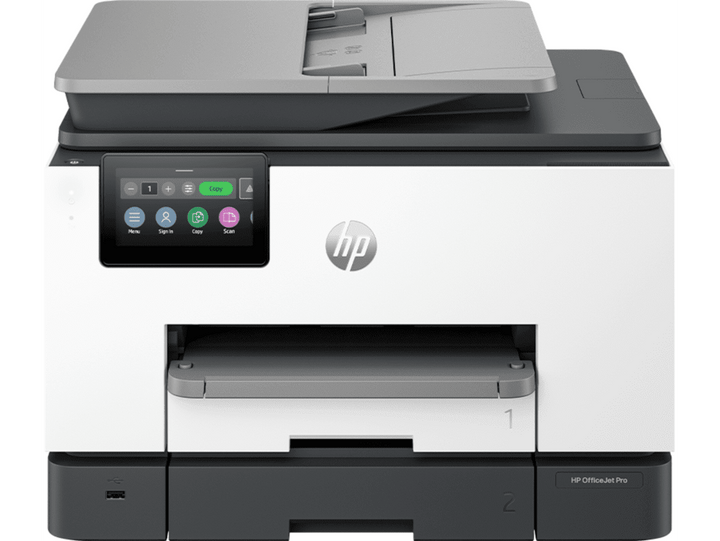

HP OfficeJet Pro 9130e All-in-One Printer
Prices in SGD, excluding 9% GST.
PRODUCT DESCRIPTION
HP OfficeJet Pro 9130e All-in-One Printer (404N0B) - 2 Years Local Warranty
The HP OfficeJet Pro 9130e All-in-One Printer (404N0B) is an A4 colour inkjet all-in-one (print, copy, scan, fax). It is supplied by SourceIT as a genuine Singapore unit with 2 years local HP warranty.
Professional colour printing
A colour inkjet all-in-one with print speeds up to 25 ppm black and 20 ppm colour.
More paper, fewer interruptions
Two 250-sheet input trays (500 sheets total), a 35-sheet ADF and automatic two-sided printing.
Reliable, secure connectivity
Dual-band, self-healing Wi-Fi, Ethernet and HP Wolf Pro Security.
Instant Ink eligible
Eligible for HP Instant Ink smart ink delivery.
Made with recycled plastic
The printer is made with 40% recycled plastic.
Ideal For
Homes, home offices and small businesses in Singapore that want dependable everyday printing with simple wireless setup and low running costs. Supplied by SourceIT with local Singapore warranty, GST invoice and corporate or project pricing on request.
OfficeJet Pro 9130e Datasheet — Technical Specifications
General
| Model | OfficeJet Pro 9130e |
| Official Product Name | HP OfficeJet Pro 9130e All-in-One Printer |
| HP Product Number | 404N0B |
| Brand | HP |
| Warranty | 2 Years Local Warranty (Singapore) - Onsite Unit Exchange |
| Product types | Inkjet printers |
| Series | Officejet |
| Functions | Print scan copy and fax |
| Duty cycle (monthly, letter) | Up to 30,000 pages |
| Duty cycle (monthly, A4) | Up to 30,000 pages |
| Recommended monthly page volume | Up to 2000 |
| Target user and print volume | Prints up to 2,000 pages/month; For teams up to 5 users |
| Top key features | Wireless; HP+; HP Instant Ink eligible; Two-sided printing; Two-sided scanning; Automatic document feeder; Fax; Touchscreen; Smart Advance Scan; Instant Paper |
| Multitasking supported | Yes |
| Number of users | 1-5 Users |
| Print colours | Yes |
| Print technology | HP Thermal Inkjet |
| Duplex printing | Automatic |
| Print speed black (ISO) | Up to 25 ppm |
| Print speed color (ISO) | Up to 20 ppm |
| Print speed black (draft, A4) | Up to 39 ppm |
| Print speed | Print speed up to 25 ppm (black) and 20 ppm (color) |
| Top margin (A4) | 3.3 mm |
| Left margin (A4) | 3.3 mm |
| Right margin (A4) | 3.3 mm |
| Bottom margin (A4) | 3.3 mm |
| Print quality black (best) | 1200 x 1200 rendered dpi |
| Print quality color (best) | Up to 4800 x 1200 optimized dpi on HP Advance Photo Paper 1200 x 1200 dpi input |
Supplies
| Number of print cartridges | 4 (1 each black, cyan, magenta, yellow) |
| Supplies feature | HP Instant Ink eligible |
Paper Handling
| Paper trays, standard | 2 |
| Paper trays, maximum | 2 |
| Envelope feeder | No |
| Automatic paper sensor | No |
| Maximum input capacity (sheets) | Up to 500 sheets |
| Input capacity | Up to 500 sheets (Tray 1: up to 250 sheets, Tray 2: up to 250 sheets) |
| Finished output handling | Sheet Feed |
| Maximum output capacity (sheets) | Up to 100 sheets |
| Output capacity | Up to 100 sheets |
| Standard output capacity (envelopes) | Up to 10 envelopes |
| Paper handling input, standard | 250-sheet input tray; 250-Sheet Multipurpose Tray; 35-sheet ADF |
| Paper handling output, standard | Up to 100 sheets |
| Media sizes supported, key | 10 x 15 cm; A4; Envelopes |
| Media sizes supported | A4, A5, A6, B5(JIS), Card (A4, Hagaki); Photo (13 x 18 cm, 10 x 15 cm); Envelope (A2, C5, C6, DL. Chou #3, Chou #4); 8.5 x 13 in |
| Media sizes, custom | Tray 1: 76.2 x 127 to 215.9 x 355.6 mm. Tray 2: N/A |
| Standard media sizes (duplex) | A4; B5; Not supported for borderless photo |
| Media types | Tray 1: Plain Paper, HP Photo Papers, HP Matte Brochure or Professional Paper, HP Matte Presentation Paper, HP Glossy Brochure or Professional Paper, Other Photo Inkjet Papers, Other Matte Inkjet Papers, Other Glossy Inkjet Papers, Thick Plain Paper, Light/Recycled Plain Paper, HP Tri-fold Brochure Paper, Glossy. Tray 2: Plain Paper |
| Media weight, supported | 60 to 105 g/m² (plain); 220 to 280 g/m² (photo); 75 to 90 g/m² (envelope); 163 to 200 g/m² (card) |
| Media weight, recommended | 60 to 105 g/m² (plain); 220 to 280 g/m² (photo); 75 to 90 g/m² (envelope); 163 to 200 g/m² (card) |
Copy
| Copies, maximum | Up to 99 copies |
| Copier settings | Number of Copies; Two-Sided; Lighter/Darker; HP Copy Fix; ID Copy; Resize; Quality; Paper Size; Paper Type; Collate; Margin Shift; Crop; Copy Preview; Tray Select; Enhancements |
| Copy reduce / enlarge settings | 25 to 400% |
Scan
| Scan technology | Contact Image Sensor (CIS) |
| Color scanning | Yes |
| Scan input modes | Front-panel scan, copy, HP Software, EWS, Mobile apps |
| Scan size, maximum | 215.9 x 297 mm |
| Bit Depth | 24-bit |
| Levels of grayscale | 256 |
| Twain version | Version 2.4 |
| Scan file format | JPG, BMP, TIFF, PDF, RTF, TXT, PNG |
| Enhanced scanning resolution | Up to 1200 dpi |
| Scan Resolution, Hardware | Up to 1200 x 1200 dpi |
| Scan Resolution, Optical | Up to 1200 dpi |
Fax
| Fax phone TAM interface supported | No |
| Auto fax reduction supported | Yes |
| Fax delayed sending | Yes |
| Fax forwarding | Yes (black only) |
| Distinctive ring detection supported | Yes |
| Fax telephone mode supported | No |
| Telephone handset supported | No |
| Faxing | Yes, color |
| Junk fax barrier | Yes |
| Fax transmission speed | 4 sec per page |
Connectivity
| Mobile printing capability | Chrome OS; HP Smart app; Apple AirPrint™; Wi-Fi® Direct Printing; Mopria™ Certified |
| Wireless capability | Yes, with built-in dual-band Wi-Fi 802.11 a/b/g/n/ac and a self-heal solution |
| Network capabilities | Yes, via built-in Ethernet; Wireless 802.11a/b/g/n/ac |
| Connectivity, standard | 1 Ethernet; 1 Hi-Speed USB 2.0 (device); 1 Hi-Speed USB 2.0 (host); 1 Wi-Fi 802.11 a/b/g/n/ac (dual band); 2 RJ-11 Fax/Modem port/phone line |
| Cable included | No, please purchase USB cable separately |
Memory & Control Panel
| Memory | 512 MB |
| Control panel | 4.3" (10.92 cm) touchscreen control panel with CGD (color graphic display) |
System Requirements & Software
| Compatible network operating systems | Windows 11; Windows 10; Windows Server; macOS 11 Big Sur; macOS 12 Monterey; macOS 13 Ventura; macOS 14 Sonoma; Linux; Chrome OS |
| Compatible Operating Systems | Windows 11; Windows 10; Windows Server; macOS 11 Big Sur; macOS 12 Monterey; macOS 13 Ventura; macOS 14 Sonoma; Linux; Chrome OS |
| Minimum System Requirements | Windows 11, 10: 32-bit or 64-bit, 2 GB available hard disk space, Internet connection, Internet Explorer. |
| Minimum System Requirements for Macintosh | MacOS 11 BigSur, MacOS 12 Monterey, MacOS 13 Ventura; 2 GB HD; Internet Required |
| Software included | HP Printer Software |
| Mac compatible | Yes |
Power & Environment
| Power Consumption Description | 5.58 watts (ready), 1.22 watts (sleep), 0.14 watts (manual-Off) |
| Power supply type | Internal (Built-in) Universal Power Supply |
| ENERGY STAR® certified | No |
| Energy Efficiency Compliance | IT ECO Declaration; EPEAT® registered |
Compatibility & Software Support
Compatibility details below are taken from HP's published specifications for the OfficeJet Pro 9130e. Drivers, software and firmware are available from HP Support (see Datasheet & Downloads).
| Twain version | Version 2.4 |
| Scan file format | JPG, BMP, TIFF, PDF, RTF, TXT, PNG |
| Fax phone TAM interface supported | No |
| Mobile printing capability | Chrome OS; HP Smart app; Apple AirPrint™; Wi-Fi® Direct Printing; Mopria™ Certified |
| Wireless capability | Yes, with built-in dual-band Wi-Fi 802.11 a/b/g/n/ac and a self-heal solution |
| Network capabilities | Yes, via built-in Ethernet; Wireless 802.11a/b/g/n/ac |
| Connectivity, standard | 1 Ethernet; 1 Hi-Speed USB 2.0 (device); 1 Hi-Speed USB 2.0 (host); 1 Wi-Fi 802.11 a/b/g/n/ac (dual band); 2 RJ-11 Fax/Modem port/phone line |
| Compatible network operating systems | Windows 11; Windows 10; Windows Server; macOS 11 Big Sur; macOS 12 Monterey; macOS 13 Ventura; macOS 14 Sonoma; Linux; Chrome OS |
| Compatible Operating Systems | Windows 11; Windows 10; Windows Server; macOS 11 Big Sur; macOS 12 Monterey; macOS 13 Ventura; macOS 14 Sonoma; Linux; Chrome OS |
| Minimum System Requirements | Windows 11, 10: 32-bit or 64-bit, 2 GB available hard disk space, Internet connection, Internet Explorer. |
| Minimum System Requirements for Macintosh | MacOS 11 BigSur, MacOS 12 Monterey, MacOS 13 Ventura; 2 GB HD; Internet Required |
| Software included | HP Printer Software |
Package Contents & Ordering Information
Ordering Information
| Model | OfficeJet Pro 9130e |
| HP Product Number | 404N0B |
| Recommended Retail Price (incl. GST) | S$654.00 |
| Consumables | HP 937 Black Original Ink Cartridge (~1,250 pages) 4S6W5N; HP 937 Cyan Original Ink Cartridge (~800 pages) 4S6W2N; HP 937 Magenta Original Ink Cartridge (~800 pages) 4S6W3N; HP 937 Yellow Original Ink Cartridge (~800 pages) 4S6W4N; HP 937e EvoMore Black Original Ink Cartridge (~2,500 pages) 4S6W9N; HP 937e EvoMore Cyan Original Ink Cartridge (~1,650 pages) 4S6W6N; HP 937e EvoMore Magenta Original Ink Cartridge (~1,650 pages) 4S6W7N; HP 937e EvoMore Yellow Original Ink Cartridge (~1,650 pages) 4S6W8N |
| Optional HP Care Pack | U6M85E (extended / upgraded HP service; ask SourceIT for pricing) |
Package Contents
| In the Box | HP OfficeJet Pro 9130 AiO Printer; HP 937 Setup Black Ink Cartridge; HP 937 Setup Cyan Ink Cartridge; HP 937 Setup Magenta Ink Cartridge; HP 937 Setup Yellow Ink Cartridge; Regulatory Flyer; Ink Caution Flyer; Power Cord; Setup Poster; Reference Guide |
Datasheet & Downloads
Frequently Asked Questions — OfficeJet Pro 9130e
What warranty does the OfficeJet Pro 9130e come with?
2 Years Local Warranty (Singapore) - Onsite Unit Exchange. Every unit sold by SourceIT is a genuine Singapore set with a GST invoice. Optional HP Care Pack U6M85E is available to extend or upgrade service.
Which consumables does the OfficeJet Pro 9130e use?
HP 937 Black Original Ink Cartridge (~1,250 pages) 4S6W5N; HP 937 Cyan Original Ink Cartridge (~800 pages) 4S6W2N; HP 937 Magenta Original Ink Cartridge (~800 pages) 4S6W3N; HP 937 Yellow Original Ink Cartridge (~800 pages) 4S6W4N; HP 937e EvoMore Black Original Ink Cartridge (~2,500 pages) 4S6W9N; HP 937e EvoMore Cyan Original Ink Cartridge (~1,650 pages) 4S6W6N; HP 937e EvoMore Magenta Original Ink Cartridge (~1,650 pages) 4S6W7N; HP 937e EvoMore Yellow Original Ink Cartridge (~1,650 pages) 4S6W8N. Always use genuine HP supplies to protect print quality and warranty coverage. SourceIT can supply them together with the printer.
Can I print from my phone to the OfficeJet Pro 9130e?
Yes. HP lists the following mobile printing support: Chrome OS; HP Smart app; Apple AirPrint™; Wi-Fi® Direct Printing; Mopria™ Certified
Is stock held locally?
SourceIT holds fast-moving HP models in Singapore. Anything not in local stock is ordered through HP's local distribution - ask us for the current lead time before committing to a date.
Can SourceIT quote for multiple units or a project?
Yes. Send us your quantity and delivery requirements and we will quote the printers together with consumables and HP Care Packs, with local warranty and GST invoice.
We Also Recommend

HP USB-C Dock G5 Workspace Docking Station


HP ZGX Nano G1n NVIDIA GB10 AI Station - 128GB / 4TB


HP ProBook 440 G11 14 U5-125U 16GB 512GB Notebook

HP USB-C Dock G5 Essential Workspace Docking Station

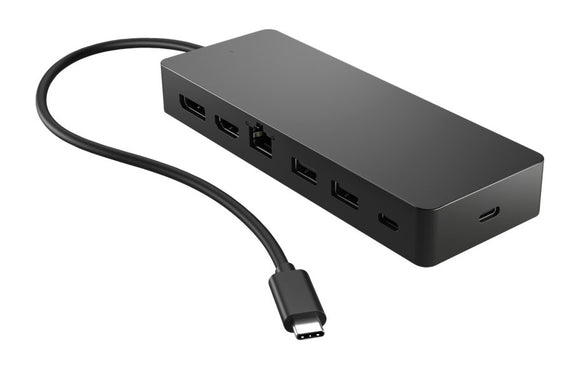
HP Universal USB-C Multiport Hub