
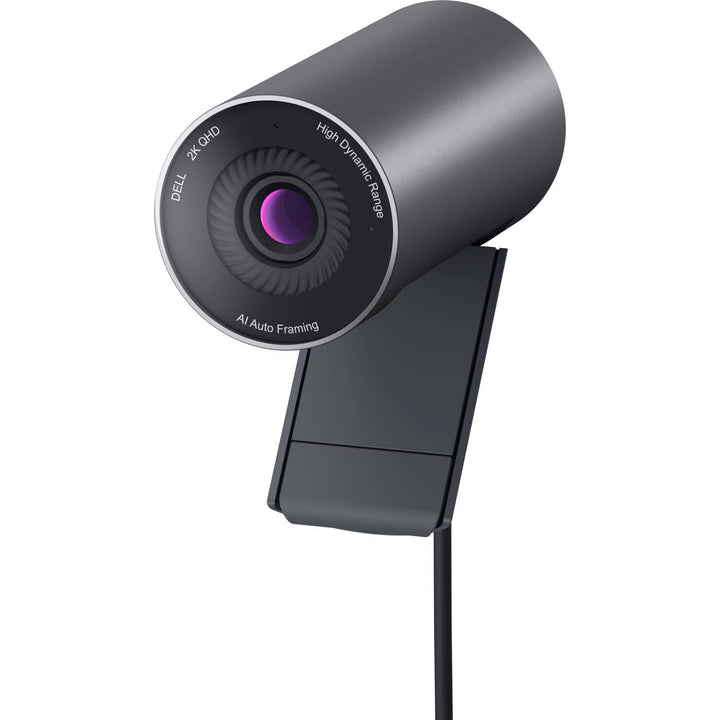


Dell Pro Webcam WB5023 2K QHD
Prices in SGD, excluding 9% GST.
PRODUCT DESCRIPTION
Dell Pro Webcam - WB5023 - 2K QHD (722-BBBS) - 3 Years Limited Hardware Warranty
2K QHD Video for Every Meeting
The Dell Pro Webcam WB5023 records 2K QHD at up to 30 fps and Full HD or HD at up to 60 fps, using a Sony STARVIS sensor with an f/2.0 aperture.
AI Auto Framing Keeps You Centred
AI auto framing follows you as you move, while autofocus, Digital Overlap HDR, facial-detection auto exposure and 3D/2D noise reduction keep the picture balanced in difficult light.
Certified for Microsoft Teams and Zoom
A built-in noise-reduction microphone, magnetic privacy shutter and a choice of 65° or 78° field of view, all adjustable in Dell Display and Peripheral Manager.
Dell WB5023 Datasheet — Technical Specifications
General
| Product Name | Dell Pro Webcam - WB5023 |
| Model | WB5023 |
| Dell SKU (Singapore) | 722-BBBS |
| Warranty | 3 years (Dell product guide); supplied locally by SourceIT with a GST invoice |
Camera
| Sensor | Sony STARVIS sensor |
| Resolution / Frame Rate | 2K QHD at 24/30 fps; Full HD at 24/30/60 fps; HD at 24/30/60 fps |
| Aperture | f/2.0 |
| Field of View | 65° or 78° |
| Digital Zoom | Up to 4x HD digital zoom |
| Autofocus | Yes |
| Light Correction | Advanced Digital Overlap (DOL) HDR (24/30 fps) |
| Noise Reduction | Temporal (3DNR) + Spatial (2DNR) |
| Auto White Balance | Yes |
| Facial-Detection Auto Exposure | Yes |
| AI Auto Framing | Yes |
Audio & Privacy
| Microphone | Built-in noise-reduction microphone (enabled in Dell Display and Peripheral Manager) |
| Privacy | Magnetic privacy shutter |
Connectivity & Design
| Connection | USB-A (USB 2.0 and above) |
| Cable Length | 1.5 m |
| Camera Dimensions (Dia x L) | 44 x 92 mm |
| Rotation | Tilt |
| Tripod Mount | Integrated tripod hole (tripod not included) |
| Weight | 155 g |
Certifications
| UC | Microsoft Teams Certified; Zoom Certified |
Compatibility & Software Support
Supported Operating Systems
Windows 10 (build 17763 and above, x64), Windows 11 (x64), Windows 11 on Arm and macOS 12 to 15, per the Dell product guide.
Software
Dell Display and Peripheral Manager (Windows and macOS) for framing, field of view, HDR and microphone settings.
Video Apps
Certified for Microsoft Teams and Zoom; Dell also lists Google Meet, Cisco Webex, Slack, GoToMeeting, BlueJeans and Lifesize.
Package Contents & Dell Webcams Ordering Information
In the Box
WB5023 webcam with universal mounting clip and magnetic privacy shutter cap, plus user documentation.
Dell Webcams
| Model | Key feature |
| WB5023 (this listing) | 2K QHD, AI auto framing, built-in mic, USB-A |
| WB526 | 2K QHD, AI auto framing, Windows Hello, USB-C |
| WB726 | 4K UHD up to 60 fps, AI auto framing, Windows Hello, USB-C |
| WB7022 | 4K UltraSharp webcam, AI auto framing, no microphone |
Datasheet & Downloads
| Dell product guide | Dell Pro Webcam WB5023 Product Guide (PDF) |
| Manuals & drivers | Documents and drivers on Dell Support |
Frequently Asked Questions — Dell WB5023
Does it have a microphone?
Yes, a built-in noise-reduction microphone; noise reduction is enabled in Dell Display and Peripheral Manager.
What resolutions does it record?
2K QHD at up to 30 fps, and Full HD or HD at up to 60 fps.
Does it support Windows Hello?
Windows Hello is not listed for the WB5023. For Windows Hello sign-in, see the WB526, WB726 or WB7022.
How does it connect?
USB-A (USB 2.0 and above) with a 1.5 m cable.
What warranty do I get?
Dell lists a 3-year warranty; supplied locally by SourceIT with a GST invoice.
We Also Recommend


Dell 27 Plus S2725QS 27" 4K Monitor


Dell 27 Plus S2725QC 27" 4K USB-C Monitor


Dell Pro 27 Plus P2725QE 27" 4K USB-C Hub Monitor


Dell Pro Smart Dock SD25TB4 Thunderbolt 4 Docking Station


Dell 27 Plus S2725DSM 27" QHD Monitor