
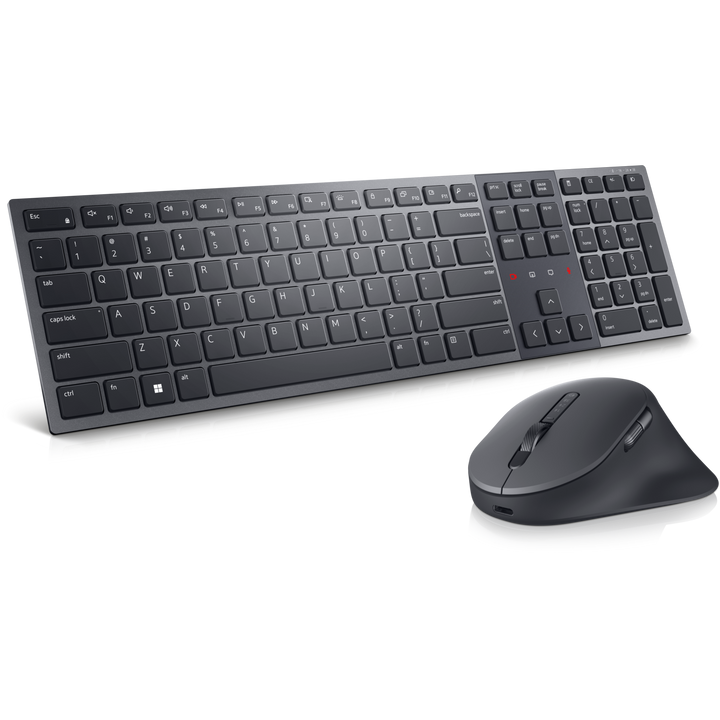


Dell Pro Premium Collaboration Keyboard and Mouse KM900 (US English)
Prices in SGD, excluding 9% GST.
PRODUCT DESCRIPTION
Dell Pro Premium Collaboration Keyboard and Mouse - KM900 - US English (580-BBHS) - 3 Years Advanced Exchange Warranty
Collaboration Controls Built In
The Dell Pro Premium Collaboration Keyboard and Mouse KM900 (previously sold as the Dell Premier Collaboration Keyboard and Mouse) adds touch collaboration controls for mute, video, screen share and chat, and is Zoom certified.
Backlit, Rechargeable and Smart
Scissor-switch keys with a numeric keypad, adjustable backlighting with an ambient light sensor and hand-proximity sensor, and USB-C charging for both keyboard and mouse.
Precision Mouse, Multi-Device Connectivity
The 7-button mouse tracks at up to 8000 DPI with a tilt wheel, and both devices connect by Bluetooth 5.1 or the Dell Secure Link USB receiver (2.4 GHz).
Dell KM900 Datasheet — Technical Specifications
General
| Product Name | Dell Pro Premium Collaboration Keyboard and Mouse - KM900 |
| Model | KM900 |
| Layout | US English |
| Dell SKU (Singapore) | 580-BBHS |
| Colour | Graphite |
| Warranty | 3 Year Limited Warranty with Advanced Exchange Service; supplied locally by SourceIT with a GST invoice |
Keyboard
| Key Switches | Scissor |
| Keypad | Full size with numeric keypad |
| Backlight | Yes, adjustable; ambient light sensor and hand-proximity sensor |
| Hot Keys | Backlight, forward, mute, play/pause, screen lock, screen snipping, search, show desktop, skip backward, task, volume up/down |
| Collaboration Controls | Touch controls for mute, video, screen share and chat |
| Adjustable Tilt | Yes |
Mouse
| Resolution | Up to 8000 DPI, adjustable from 800 to 8000 in increments of 200 |
| Buttons | 7 |
| Scrolling | Scroll wheel and tilt wheel |
Connectivity & Power
| Wireless | Bluetooth 5.1 and 2.4 GHz RF via Dell Secure Link USB receiver |
| Charging | USB-C (rechargeable batteries in keyboard and mouse) |
| Charging Power | Keyboard 3.25–15 W; mouse 2.5 W (charger not included) |
Physical
| Keyboard (H x W x D) | 20.7 x 439.7 x 121.6 mm |
| Keyboard Weight | 728 g (approx.) |
| Mouse (H x W) | 45.8 x 89.8 mm |
| Mouse Weight | 128.4 g (approx.) |
Certifications
| UC | Zoom Certified |
Compatibility & Software Support
Operating Systems
Windows 11, 10, 8.1 and 7, macOS, ChromeOS, Android, Red Hat Enterprise Linux 8 and Ubuntu 18.04, per Dell.
Software
Dell Peripheral Manager (Windows only) for programmable keys, backlight and mouse settings.
Microsoft Teams
Dell states that Microsoft Teams support for the touch collaboration controls ended on 30 June 2026; the controls remain Zoom certified.
Package Contents & Dell Keyboards & Mice Ordering Information
In the Box
KM900 keyboard and mouse, Dell Secure Link USB receiver, USB-C to USB-C charging cable, documentation.
Dell Keyboards & Mice
| Model | Key feature |
| KM5221W | Pro wireless keyboard and mouse with USB receiver |
| KM900 (this listing) | Rechargeable, backlit, collaboration touch controls, Bluetooth + RF |
Datasheet & Downloads
| Dell product page | KM900 on dell.com (UK layout page; specifications are common to all layouts) |
| Dell Support | Drivers, manuals and Dell Peripheral Manager |
Frequently Asked Questions — Dell KM900
Which keyboard layout is this?
US English (Dell SKU 580-BBHS).
Do the collaboration keys work with Microsoft Teams?
Dell states that Microsoft Teams support for the touch collaboration controls ended on 30 June 2026. The controls are Zoom certified.
How do I charge it?
Both the keyboard and the mouse charge over USB-C; a USB-C to USB-C cable is included, a wall charger is not.
How does it connect?
By Bluetooth 5.1 or the included Dell Secure Link USB receiver (2.4 GHz RF).
What warranty do I get?
3-year Dell limited warranty with Advanced Exchange Service, supplied locally by SourceIT with a GST invoice.


