
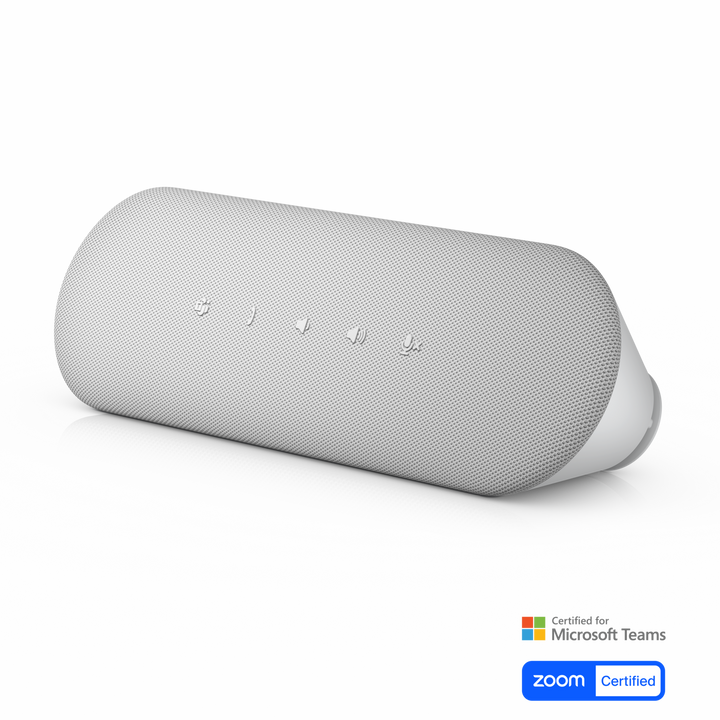


Dell Pro Desktop Speakerphone SP3022
Prices in SGD, excluding 9% GST.
PRODUCT DESCRIPTION
Dell Pro Desktop Speakerphone - SP3022 (520-AAVX) - 3 Years Limited Hardware Warranty
Clear Calls with AI Noise Cancellation
The Dell Pro Desktop Speakerphone SP3022 uses AI noise cancellation, full-duplex audio and echo cancellation so voices stay clear and several people can speak at once.
Stereo Sound on Your Desk
Left and right speakers deliver stereo output for calls and music, at up to 90 dB, and the compact bar sits on a monitor base or beside a laptop or desktop.
One-Touch Microsoft Teams
A dedicated Microsoft Teams button and LED indicators for Teams status, call, volume and mic mute, certified for Microsoft Teams and Zoom.
Dell SP3022 Datasheet — Technical Specifications
General
| Product Name | Dell Pro Desktop Speakerphone - SP3022 |
| Model | SP3022 |
| Dell SKU (Singapore) | 520-AAVX |
| Warranty | 3 years (Dell product guide); supplied locally by SourceIT with a GST invoice |
Audio
| Speakers | Stereo (left and right); 2 x 1.8 W (USB 3.0), 2 x 1 W (USB 2.0) |
| Speaker Frequency Range | 90 Hz – 20 kHz |
| Sound Pressure Level | 90 dB |
| Microphone | Single microphone, omni-directional; SNR ≥ 72 dB |
| Microphone Frequency Range | 120 Hz – 7 kHz |
| Digital Signal Processing | AI noise cancellation, full duplex audio, echo cancellation |
Controls
| Buttons | Microsoft Teams, mute/unmute, volume up/down, answer/end/reject call |
| Indicators | LEDs for Teams status, call/hang-up, volume and mic mute |
Connectivity & Design
| Connection | USB-A with integrated USB-C adapter |
| Cable Length | 850 mm |
| Dimensions (L x W x D) | 226 x 71 x 58.3 mm |
| Weight | 327 g |
Certifications
| UC | Certified for Microsoft Teams and Zoom |
Compatibility & Software Support
Supported Operating Systems
Windows 10 (build 17763 and above, x64), Windows 11 (x64) and Windows 11 on Arm, per the Dell product guide.
Software
Dell Display and Peripheral Manager for audio presets, notifications and firmware updates.
Connection
Plugs into a monitor USB port or directly into a computer USB-A or USB-C port.
Package Contents & Dell Speakerphones Ordering Information
In the Box
SP3022 speakerphone, USB Type-C to Type-A adapter, documentation.
Dell Speakerphones
| Model | Key feature |
| MH3021P | Speakerphone with multiport adapter |
| SP3022 (this listing) | Desktop stereo speakerphone, AI noise cancellation, USB-A/C |
| SP325 | Wired USB-C speakerphone, 4 mics, IP64 |
| SL525 | Wireless Bluetooth/USB-C speakerphone, 12-hour battery, IP64 |
| SB725 | Monitor-mounted conferencing soundbar for P-series and UltraSharp |
Datasheet & Downloads
| Dell product guide | Dell Speakerphone SP3022 Product Guide (PDF) |
| Usage & troubleshooting | SP3022 usage and troubleshooting guide on Dell Support |
| Manuals & drivers | Documents and drivers on Dell Support |
Frequently Asked Questions — Dell SP3022
Is it stereo?
Yes, it has left and right speakers for stereo output.
How does it connect?
USB-A, with an integrated USB-C adapter, on an 850 mm cable; it can plug into a monitor or directly into a computer.
Does it work with Microsoft Teams and Zoom?
Yes, it is certified for both and has a dedicated Microsoft Teams button.
Is it suitable for a meeting room?
It is designed as a desktop speakerphone with a single omni-directional microphone. For small huddle spaces, see the SP325 or SL525 with four microphones.
What warranty do I get?
Dell lists a 3-year warranty; supplied locally by SourceIT with a GST invoice.
We Also Recommend


Dell 27 Plus S2725QS 27" 4K Monitor


Dell 27 Plus S2725QC 27" 4K USB-C Monitor


Dell Pro 27 Plus P2725QE 27" 4K USB-C Hub Monitor


Dell Pro Smart Dock SD25TB4 Thunderbolt 4 Docking Station


Dell 27 Plus S2725DSM 27" QHD Monitor