


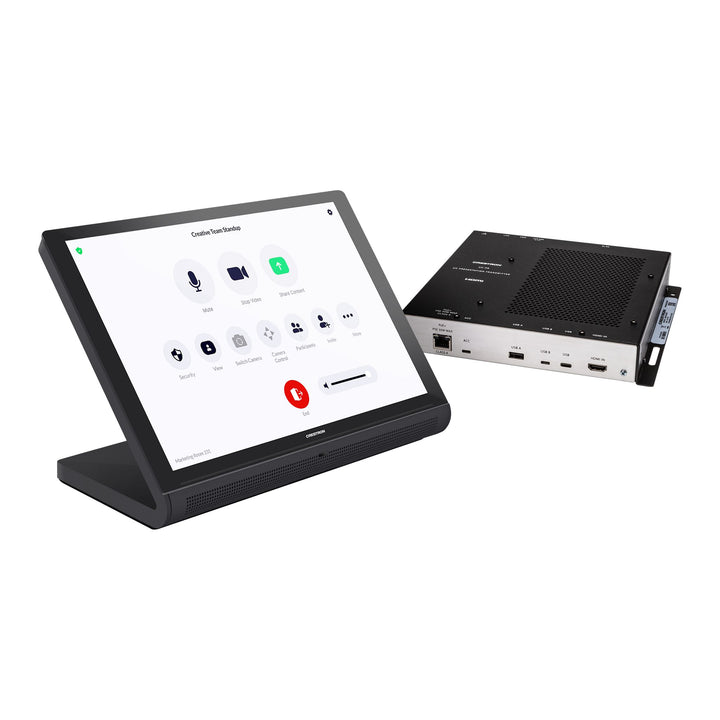


Crestron Flex Advanced Video Conference System Integrator Kit for Microsoft Teams Rooms and Zoom Rooms
Email sales@sourceit.com.sg or use Request for Quotation below and our team will confirm the latest price, availability and lead time.
PRODUCT DESCRIPTION
Crestron Flex Advanced Video Conference System Integrator Kit for Microsoft Teams Rooms and Zoom Rooms - Local Warranty
A customisable Crestron Flex integrator kit for building a fully custom video conferencing room around your own choice of displays, cameras, speakers and microphones. Each kit combines a UC Engine on a ready-to-mount bracket, a 10.1 in. Crestron touch screen (tabletop or wall mount) and a UC Presentation Transmitter for content sharing and BYOD.
Key Features
- Native Microsoft Teams Rooms or Zoom Rooms experience, including a Zoom Rooms Pro version with an Intel Core i7 UC Engine Pro
- Complete kit: 10.1 in. touch screen, UC Presentation Transmitter (UC-PR) and preassembled UC Bracket Assembly
- Use any compatible USB camera and USB audio conferencing interface or speakerphone for a fully custom room
- BYOD: the UC-PR switches to the connected laptop's own UC platform and returns to the native platform when disconnected
- Up to 60 W device charging over USB-C on the UC-PR
- Single or dual displays (Teams) or up to three displays (Zoom); Pro version supports up to four cameras with Multi-camera, Multi-stream and Intelligent Director
- Provisioning and management through the XiO Cloud service; optional Crestron control system integration for room control
UC-CX100 Datasheet — Technical Specifications
General
| Product Name | Crestron Flex Advanced Video Conference System Integrator Kit |
| Brand | Crestron |
| Part Numbers | UC-CX100-PRO-Z, UC-CX100-PRO-Z-WM, UC-CX100-T, UC-CX100-T-WM, UC-CX100-Z, UC-CX100-Z-WM |
| Platforms | Microsoft Teams Rooms (-T), Zoom Rooms (-Z), Zoom Rooms with UC Engine Pro (-PRO-Z) |
| Control Interface | Tabletop touch screen (TS-1070) or wall mount touch screen (TSW-1070, -WM models) |
| Displays | Teams kits: single or dual displays; Zoom and Zoom Pro kits: up to three displays (displays not included) |
| Cameras | Pro kits: up to four cameras (not included) |
Touch Screen (TS-1070 tabletop / TSW-1070 wall mount)
| Display | 10.1 in. (257 mm) capacitive multi-touch TFT active matrix colour LCD, 1920 x 1200 pixels |
| UI | Microsoft Teams or Zoom Rooms UI plus optional Crestron Smart Graphics room control UI |
| Ethernet | 100 Mbps (Teams and Zoom kits) or 100/1000 Mbps (Pro kits); TCP/IP, UDP/IP, CIP, DHCP, SSL, TLS, SSH, SFTP, IEEE 802.1X, SNMP, IPv4 or IPv6, Active Directory authentication, HTTPS web setup, XiO Cloud client |
| Power over Ethernet | IEEE 802.3at Type 2 PoE+ PD; powered via PoE passthrough on the UC-PR |
| Construction | Plastic, smooth black finish, edge-to-edge glass with black surround |
| Dimensions (H x W x D) | Tabletop: 134 x 245 x 119 mm (5.29 x 9.63 x 4.67 in.); Wall mount: 149 x 240 x 51 mm (5.87 x 9.46 x 2.01 in.), excluding mounting bracket |
| Weight | Tabletop: 1105 g (2.44 lb); Wall mount: 730 g (1.61 lb) |
UC Bracket Assembly
| UC Engine | Mini PC, Intel Core processor, Windows 11 IoT Edition, 100/1000 Mbps Ethernet (Teams and Zoom kits) |
| UC Engine Pro | Mini PC, 12th Generation Intel Core i7 processor, Windows 11 IoT Edition, 100/1000 Mbps Ethernet (Pro kits) |
| UC Client | Microsoft Teams Rooms with Skype for Business software functionality, or Zoom Rooms software |
| Management Client | XiO Cloud service |
| Content Ingest | HDMI input via CAT5 to USB 3.0 converter |
| Display Output Resolution | 1080p |
| Power | UC Engine: 100-240 VAC, 50/60 Hz adapter (included); converter: 24 VDC via external power pack (included) |
| Mounting | Surface wall mount behind the display, or attach to the rear of the display via a VESA compliant display mount; mounting holes spaced 100, 200 and 300 mm |
| Dimensions (H x W x max. D) | 381 x 368 x 48 mm (15.00 x 14.50 x 1.87 in.) |
| Maximum Weight | 3.7 kg (8.0 lb) |
UC Presentation Transmitter (UC-PR)
| Video / Audio Inputs | HDMI; DisplayPort 1.2 via USB Type-C |
| Output | HDMI over CAT5 |
| Resolution | 1080p |
| Content Protection | HDCP 1.4 and HDCP 2.2 |
| Connectors | LAN PoE (RJ-45), To RX (RJ-45), LAN (RJ-45), HDMI IN, USB-C 2.0, USB-A 2.0, USB-B 2.0, USB 3.0 Type B (firmware only), DC power |
| Power Supply | 24 VDC, 3.75 A, 100-240 VAC, 90 W |
| Device Charging | Up to 60 W via USB-C |
| Mounting | Surface mount under table; attaches to a single rack rail |
| Dimensions (H x W x D) | 40 x 235 x 208 mm (1.58 x 9.25 x 8.20 in.) |
Compatibility & Software Support
Ecosystem
| Conferencing Platforms | Microsoft Teams Rooms (cloud, on-premises Skype for Business or hybrid) on -T models; Zoom Rooms software on -Z and -PRO-Z models |
| Peripherals | Any Microsoft Teams or Zoom Rooms compliant USB camera and USB audio conferencing interface or speakerphone |
| Zoom Pro Functions | Multi-camera, Multi-stream and Intelligent Director (PRO-Z models) |
| Provisioning & Management | XiO Cloud service (available separately); system updates via Windows software update |
| Room Control | Optional Crestron control system integration for lighting, shades, climate and AV (additional equipment and programming required) |
| Additional Control Point | A TS- or TSW-70 series 10.1 in. touch screen may be added |
| Support | Crestron Flex Care optional subscription service |
Displays must support "Wake on Sync" and "Sleep on No Sync". The UC-PR USB-C port uses DisplayPort alternate mode; laptops without USB-C can use HDMI plus USB-B for content sharing and BYOD.
Package Contents & Ordering Information
In the Box
- 10.1 in. touch screen, black: TS-1070 tabletop or TSW-1070 wall mount (-WM models)
- UC Bracket Assembly (UC-BRKT-260-P-T-ASSY, UC-BRKT-260-P-Z-ASSY or UC-BRKT-260-PRO-Z-ASSY) with UC Engine, CAT5 to USB 3.0 content ingest converter and mounting hardware; Teams kits also include an ADPT-USB-ENET USB-to-Ethernet adapter
- UC-PR UC Presentation Transmitter with cable organiser
- CBL-4K-DP-HD-6 DisplayPort to HDMI cable, 1.8 m (secondary display)
- CBL-HD-6 HDMI cable, 1.8 m (primary display)
- CBL-CAT5E-7 Ethernet cables, 2.1 m: (2) on Teams kits, (3) on Zoom and Pro kits
- DM-CBL-ULTRA-PC-20 CAT6a Ethernet cable, 6.1 m: (2) on Teams kits, (1) on Zoom and Pro kits
Models
| Configuration | Part number |
| Zoom Rooms Pro, tabletop touch screen | UC-CX100-PRO-Z |
| Zoom Rooms Pro, wall mount touch screen | UC-CX100-PRO-Z-WM |
| Microsoft Teams Rooms, tabletop touch screen | UC-CX100-T |
| Microsoft Teams Rooms, wall mount touch screen | UC-CX100-T-WM |
| Zoom Rooms, tabletop touch screen | UC-CX100-Z |
| Zoom Rooms, wall mount touch screen | UC-CX100-Z-WM |
Displays, cameras and audio devices are not included.
Datasheet & Downloads
| Product page (Teams) | Crestron UC-CX100-T product page |
| Product page (Zoom) | Crestron UC-CX100-Z product page |
| Product page (Zoom Pro) | Crestron UC-CX100-PRO-Z product page |
| Quick Start (Teams) | UC-CX100-T Quick Start guide (Doc. 8883) |
| Quick Start (Zoom) | UC-CX100-Z Quick Start guide (Doc. 8882) |
| Product manual | Crestron Flex UC solutions product manual (online) |
Frequently Asked Questions — UC-CX100
What is the difference between the Teams, Zoom and Zoom Pro kits?
The -T kits run Microsoft Teams Rooms and support single or dual displays. The -Z kits run Zoom Rooms and support up to three displays. The -PRO-Z kits use the UC Engine Pro (12th Gen Intel Core i7), support up to three displays and up to four cameras, and are compatible with Zoom Multi-camera, Multi-stream and Intelligent Director.
What does "-WM" mean?
The -WM models ship with the TSW-1070 10.1 in. wall mount touch screen instead of the TS-1070 tabletop touch screen.
Are a camera and speakers included?
No. The integrator kit is designed for custom rooms: you choose the displays, cameras, speakers and microphones. Any Teams or Zoom Rooms compliant USB camera and USB audio interface or speakerphone can be used.
Can guests use their own conferencing app?
Yes. When a laptop is connected to the UC-PR, the system switches to the laptop's own UC platform (BYOD) and returns to the native platform when the laptop is disconnected.
Where is the UC Engine mounted?
The UC Engine comes preassembled on the UC Bracket Assembly, which can be mounted on the wall behind the display or attached to the rear of the display via a VESA compliant display mount.


