
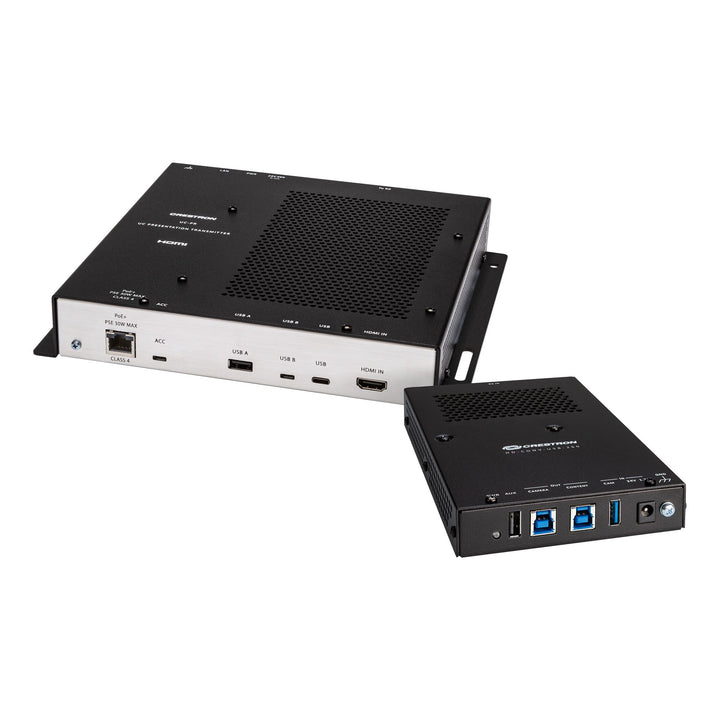


Crestron Collab Compute Bring Your Own Device (BYOD) Kit
Email sales@sourceit.com.sg or use Request for Quotation below and our team will confirm the latest price, availability and lead time.
PRODUCT DESCRIPTION
Crestron Collab Compute Bring Your Own Device (BYOD) Kit - Local Warranty
Adds Bring Your Own Device conferencing to Crestron Collab Compute room systems. When a laptop is connected, the UC Presentation Transmitter switches the room to the laptop's meeting platform, and returns to the Collab Compute's native platform when it is disconnected.
Key Features
- BYOD conferencing for CCC-110-T, CCC-110-Z, CCC-120-T and CCC-120-Z
- Automatic switching between the laptop's meeting platform and the native room platform
- Single USB-C 2.0 connection for content sharing, BYOD and up to 60 W device charging
- HDMI plus USB-B alternative for laptops without USB-C
- 1080p video with HDCP 1.4 and HDCP 2.2 content protection, carried over CAT5
- Metal chassis with integral flanges for single rack rail or freestanding mounting
CCC-BYOD-KIT Datasheet — Technical Specifications
General
| Product Name | Crestron Collab Compute Bring Your Own Device (BYOD) Kit |
| Brand | Crestron |
| Part Numbers | CCC-BYOD-KIT |
| Kit Components | UC Presentation Transmitter (UC-PR) and HD-CONV-USB-260 |
UC Presentation Transmitter (UC-PR)
| Video Inputs | HDMI; DisplayPort 1.2 via USB Type-C |
| Video Output | HDMI over CAT5; 1080p; HDCP 1.4 and HDCP 2.2 |
| Audio | HDMI or DisplayPort 1.2 via USB-C input; HDMI over CAT5 output |
| Ethernet | 100 Mbps |
| USB | USB 2.0 and USB 3.0 |
| Connectors | 1 x USB-C 2.0, 1 x HDMI In, 1 x USB-A 2.0, 1 x USB-B 2.0, 1 x USB 3.0 Type B (ACC, firmware only), LAN PoE, LAN and To RX RJ-45 ports, DC power jack, ground screw |
| Power | 24 VDC 3.75 A, 90 W (included power supply, 100–240 VAC) |
| Device Charging | Up to 60 W via USB Type-C |
| Dimensions (H x W x D) | 40 x 235 x 213 mm (1.58 x 9.25 x 8.37 in) |
HD-CONV-USB-260
| RX In | 1 x RJ-45, DM Essentials from the UC-PR |
| USB Outputs | Camera Out and Content Out: 2 x USB 3.0 Type B for USB UVC devices |
| Other Connectors | 1 x USB 3.0 Type A (CAM IN); 1 x USB 2.0 Type B (AUX, USB UAC device); DC power; ground screw |
| Power | 24 VDC 1.25 A (included power supply, 100–240 VAC) |
| Dimensions (H x W x D) | 27 x 116 x 163 mm (1.05 x 4.55 x 7.19 in) |
Environmental & Construction
| Operating Temperature | 0° to 40° C (32° to 104° F) |
| Humidity | 10% to 95% RH non-condensing |
| Chassis | Metal, black finish, integral mounting flanges; vented |
| Mounting | Single rack rail or freestanding |
Compatibility & Software Support
Ecosystem
| Compatible Collab Compute | CCC-110-T, CCC-110-Z, CCC-120-T, CCC-120-Z |
| Laptop Connection | USB-C with DisplayPort Alternate Mode, or HDMI plus USB-B |
| Meeting Platforms | Laptop's own conferencing platform when connected; Collab Compute native platform when disconnected |
USB-C devices must support DisplayPort Alternate Mode for video; some may not support charging over the same port. Crestron maintains a list of tested devices in Community Article 1000889.
Package Contents & Ordering Information
Models
| Configuration | Part number |
| Collab Compute BYOD Kit | CCC-BYOD-KIT |
Datasheet & Downloads
| Product page | Crestron CCC-BYOD-KIT product page |
Frequently Asked Questions — CCC-BYOD-KIT
Which Collab Compute models does the kit work with?
CCC-110-T, CCC-110-Z, CCC-120-T and CCC-120-Z.
What happens when a laptop is plugged in?
The UC Presentation Transmitter switches to the laptop's meeting platform, giving it access to the room's conferencing devices. When the laptop is disconnected, the room returns to the Collab Compute's native platform.
Can it charge my laptop?
The USB-C port provides up to 60 W charging, but some devices that support DisplayPort Alternate Mode may not support charging over the same connection.
What if my laptop has no USB-C?
An HDMI plus USB-B connection can be used for content sharing and BYOD functionality instead.


