
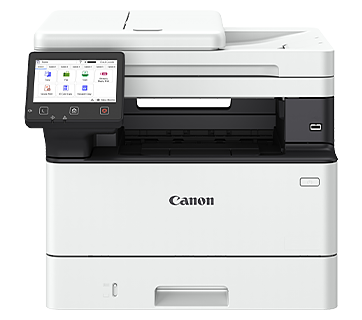


Canon imageCLASS MF461dw II Wireless Mono Laser All-in-One Printer
PRODUCT DESCRIPTION
Canon imageCLASS MF461dw II Wireless Mono Laser All-in-One Printer (7188C018AA) - 3 Years Local Warranty
The Canon imageCLASS MF461dw II is Canon's streamline Your Office Workflow with the 3-in-1 Multifunction Printer. It has a rated print speed of 36 ppm, with Wi-Fi, Ethernet and USB connectivity.
5" Colour LCD Touchscreen
Navigate and configure the printer settings easily with the colour touchscreen display panel that comes with a vari-angle mechanism for greater viewing flexibility and clarity.
Single Pass Duplex Scan
Maximise scanning efficiency with the 50-sheet single-pass duplex automatic document feeder (DADF) and skip blank page while scanning.
Auto Duplex Printing
Print two-sided documents to effectively reduce paper usage while lowering carbon footprint and operating costs.
Expandable Paper Capacity
Expand paper handling capability up to 900 sheets by adding an optional paper feeder.
Minimal Maintenance
Canon's all-in-one toner cartridges provide hassle-free, low-maintenance operation.
Enhanced Data Security
Safeguard print data against tampering by encrypting communication data with the latest protocol, TLS 1.3. Monitor system integrity during startup with Verify System at Startup.
Support Multiple Printing Environments
In addition to Canon's proprietary UFR II print language, industry standard PCL6 and Adobe® PostScript® 3™ print languages are supported to ensure seamless integration with a wide range of business applications.
Ideal For
Small and medium offices in Singapore that need fast mono laser printing plus scanning and copying (and fax where fitted) from one compact, managed device. Supplied by SourceIT with local Singapore warranty, GST invoice and corporate or project pricing on request.
imageCLASS MF461dw II Datasheet — Technical Specifications
General
| Model | imageCLASS MF461dw II |
| Official Product Name | imageCLASS MF461dw II |
| Canon Product Code | 7188C018AA |
| EAN / UPC | 4549292248845 |
| Brand | Canon |
| Warranty | 3 Years Local Warranty (Singapore) - 3 years on-site warranty by Canon Singapore |
| Printing Method | Monochrome Laser Beam Printing |
| Print Speed A4*1 | 36 ppm |
| Print Speed Letter*1 | 37 ppm |
| Print Speed 2-Sided | 30 ipm (A4) / 31 ipm (Letter) |
| Print Resolution | 600 x 600 dpi |
| Print Quality with Image Refinement Technology | 1,200 x 1,200 dpi (Equivalent) |
| Warm-Up Time (From Power On) | 14 sec |
| First Print Out Time (FPOT) (Approx.)*2 A4 | 5 sec |
| Print Language | UFR II, PCL 6, Adobe® PostScript® 3™ |
| Auto Duplex Print | Yes |
| Print Margins | Top/Bottom/Left/Right margin: 5 mm; Top/Bottom/Left/Right margin: 10 mm (Envelope) |
| Supported File Format for USB Direct Print | JPEG, TIFF, PDF |
Copy
| Copy Speed A4 | 36 ppm |
| Copy Resolution | Up to 600 x 600 dpi |
| First Copy Out Time (FCOT) (Approx.) Platen Glass A4 | 6.1 sec |
| First Copy Out Time (FCOT) (Approx.) ADF A4 | 6.1 sec |
| Reduce/Enlargement | 25 - 400% in 1% increments |
| Copy Features | Collate, 2 on 1, 4 on 1, ID Card Copy, Passport Copy, 2-sided originals |
Scan
| Scan Resolution Optical | Up to 600 x 600 dpi |
| Scan Resolution Driver Enhanced | Up to 9,600 x 9,600 dpi |
| Scan Type | Colour Contact Image Sensor |
| Maximum Scan Size Platen Glass | Up to 216 x 297 mm |
| Maximum Scan Size Auto Document Feeder | Up to 216 x 356 mm |
| Scan Speed*3 Platen Glass | 1.8/1.9 sec (Mono/Colour) |
| Scan Speed*3 Auto Document Feeder, A4 (Mono/Colour) | 1-Sided: 50 ipm (Mono), 40 ipm (Colour); 2-Sided: 100 ipm (Mono), 80 ipm (Colour) |
| Colour Depth | 24-bit |
| Pull Scan | Yes, USB and Network |
| Push Scan (Scan To PC) with MF Scan Utility | Yes, USB and Network |
| Scan To Cloud | MF Scan Utility |
| Scan Driver Compatibility | TWAIN, WIA |
Send
| Send Method | SMB, Email, FTP |
| Colour Mode | Full Colour, Greyscale, Monochrome |
| Scan Resolution | 300 x 600 dpi |
| File Format | JPEG (Single page), TIFF, PDF, Compact PDF, PDF (OCR) |
Paper Handling
| Input Tray Capacity Standard Cassette | 250 sheets |
| Input Tray Capacity Standard Multi-Purpose Tray | 100 sheets |
| Input Tray Capacity Standard Auto Document Feeder | 50-Sheet Duplex, Single Pass |
| Input Tray Capacity Optional Paper Feeder | 550 sheets |
| Input Tray Capacity Maximum | 900 sheets (Standard + 1 Paper Feeder) |
| Output Tray Capacity (Plain Paper, 80 g/m²) | 150 sheets |
| Media Size Cassette / Paper Feeder | A4, A5, A6, Legal, Letter, Foolscap, Indian Legal, Custom (min. 105 x 148 mm to max. 216 x 355.6 mm) [The cassette may not fully close when loaded with paper longer than A4 size.] |
| Media Size Multi-Purpose Tray | A4, A5, A6, Legal, Letter, Foolscap, Indian Legal, Index Card, Postcard, Envelope (COM10, Monarch, DL, C5), Custom (min. 76.2 x 127 mm to max. 216 x 355.6 mm) |
| Media Size Auto Document Feeder | A4, A5, A6, Letter, Legal (min. 148 x 105 mm to max. 216 x 356 mm); Business Card: 48 x 85 mm |
| Media Size 2-Sided Printing | A4, Legal, Letter, Foolscap, Indian Legal, Custom (min. 210 x 279.4 mm to max. 216 x 355.6 mm) |
| Media Type | Plain Paper, Recycled Paper, Colour Paper, Bond Paper |
| Media Weight Cassette / Paper Feeder | 60 - 120 g/m² |
| Media Weight Multi-Purpose Tray | 60 - 199 g/m² |
| Media Weight Auto Document Feeder | 50 - 105 g/m² (Business Card: 80 - 209 g/m²) |
Connectivity & Software
| Standard Interfaces Wired | USB 2.0, 10Base-T/100Base-TX/1000Base-T |
| Standard Interfaces Wireless | Wi-Fi 802.11b/g/n (Infrastructure Mode, Access Point, WPS) |
| Network Protocol Print | LPD, RAW, IPP, IPPS, WSD-Print (IPv4, IPv6) |
| Network Protocol Scan | Email, SMB, WSD-Scan (IPv4, IPv6), FTP, Oauth 2.0 |
| Network Protocol TCP/IP Application Services | mDNS, DHCP, Auto IP (IPv4), DHCPv6 (IPv6) |
| Network Protocol Management | SNMPv3 (IPv4, IPv6), HTTP/HTTPS, SNTP |
| Network Security Wired | IP/Mac Address Filtering, HTTPS, SNMPv3, IEEE802.1X, IPsec, TLS 1.3 |
| Network Security Wireless | Infrastructure Mode: WPA-PSK(AES), WPA2-PSK(AES), WPA3-SAE(AES), WPA-EAP(AES), WPA2-EAP(AES), WPA3-EAP(AES); Access Point Mode: WPA2-PSK(AES), WPA3-SAE(AES) |
| Mobile Solution | Canon PRINT app, AirPrint®, Mopria®, Microsoft Universal Print |
| Compatible Operating System*4 | Windows®10/11, Windows® Server 2016/2019/2022/2025, macOS 10.15 or later, Linux, Chrome OS |
| Other Features | Department ID, Secure Print, Skip Blank Page, Application Library |
| Available Software | Printer Driver, Scanner Driver, MF Scan Utility, Toner Status |
General
| Device Memory | 1 GB |
| Storage (eMMC) | 2 GB |
| Display | 5" LCD Touchscreen |
| Power Requirements | AC 220 - 240 V, 50/60 Hz |
| Power Consumption Operation | 480 W (max. 1,250 W) |
| Power Consumption Standby | 6 W |
| Power Consumption Sleep | 0.9 W |
| Operating Environment Temperature | 10 - 30°C |
| Operating Environment Humidity | 20 - 80% RH (no condensation) |
| Monthly Duty Cycle*5 | 80,000 pages |
| Dimensions (W x D x H) | 420 x 460 x 375 mm |
| Weight*6 (Approx.) | 16.2 kg |
| Toner Cartridge*7 | Standard Cartridge 070: 3,000 pages (Bundled: 3,000 pages); High Cartridge 070H: 10,200 pages |
Optional Accessories
| Paper Feeder | Cassette Feeding Unit-AH1 (550 sheets) |
Footnotes
| *1 | Print speed is measured based on internal testing using A4/Letter size paper printed with 100% print ratio to original on one-sided paper. Internal testing involved continuously printing the same one page of content on plain paper. Print speed may vary depending on paper type, paper size or paper feeding direction. |
| *2 | First print out time is measured based on internal test procedure and may vary. When the printer is in the ready state, this is the time from receiving the print instruction from the controller to printing one sheet and finishing paper ejection. |
| *3 | Scan resolution 300 x 300 dpi. |
| *4 | The latest drivers for Windows, Windows Server, Mac OS and Linux can be downloaded from the https://asia.canon/en/support website when available. |
| *5 | Monthly Duty Cycle value provides a means of comparison for product robustness in relation to other Canon laser printer devices, and does not refer to actual maximum image output per month. |
| *6 | Excluding toner cartridge. |
| *7 | Toner cartridge yield is in accordance with ISO/IEC 19752. |
Compatibility & Software Support
Compatibility details below are taken from Canon Singapore's published specification for the imageCLASS MF461dw II. Drivers, utilities and firmware are available from Canon Singapore's support site (see Datasheet & Downloads).
| Scan Resolution Driver Enhanced | Up to 9,600 x 9,600 dpi |
| Scan To Cloud | MF Scan Utility |
| Scan Driver Compatibility | TWAIN, WIA |
| Mobile Solution | Canon PRINT app, AirPrint®, Mopria®, Microsoft Universal Print |
| Compatible Operating System*4 | Windows®10/11, Windows® Server 2016/2019/2022/2025, macOS 10.15 or later, Linux, Chrome OS |
Package Contents & Ordering Information
Ordering Information
| Model | imageCLASS MF461dw II |
| Canon Product Code | 7188C018AA |
| EAN / UPC | 4549292248845 |
| Recommended Retail Price (incl. GST) | S$839.00 |
| Consumables | Cartridge 070 Black: 3,000 pages (ISO/IEC 19752); Cartridge 070H Black: 10,200 pages (ISO/IEC 19752). Bundled starter: 3,000 pages. Optional: Cassette Feeding Unit-AH1 (550 sheets). |
Canon Singapore does not publish an itemised in-the-box list for this model. Please ask SourceIT if you need the exact package contents confirmed before ordering.
Datasheet & Downloads
Frequently Asked Questions — imageCLASS MF461dw II
What warranty does the imageCLASS MF461dw II come with?
3 Years Local Warranty from Canon Singapore: 3 years on-site warranty by Canon Singapore. Every unit sold by SourceIT is a genuine Singapore set with a GST invoice.
Which consumables does the imageCLASS MF461dw II use?
Cartridge 070 Black: 3,000 pages (ISO/IEC 19752); Cartridge 070H Black: 10,200 pages (ISO/IEC 19752). Bundled starter: 3,000 pages. Optional: Cassette Feeding Unit-AH1 (550 sheets). Always use genuine Canon consumables to protect print quality and warranty coverage. SourceIT can supply them together with the printer.
Can I print from my phone to the imageCLASS MF461dw II?
Yes. Canon lists the following mobile and cloud printing support: MF Scan Utility; Canon PRINT app, AirPrint®, Mopria®, Microsoft Universal Print
Is stock held locally?
SourceIT holds fast-moving Canon models in Singapore. Anything not in local stock is ordered through Canon Singapore's local distributor - ask us for the current lead time before committing to a date.
Can SourceIT quote for multiple units or a project?
Yes. Send us your quantity and delivery requirements and we will quote the printers together with consumables, with local warranty and GST invoice.


