
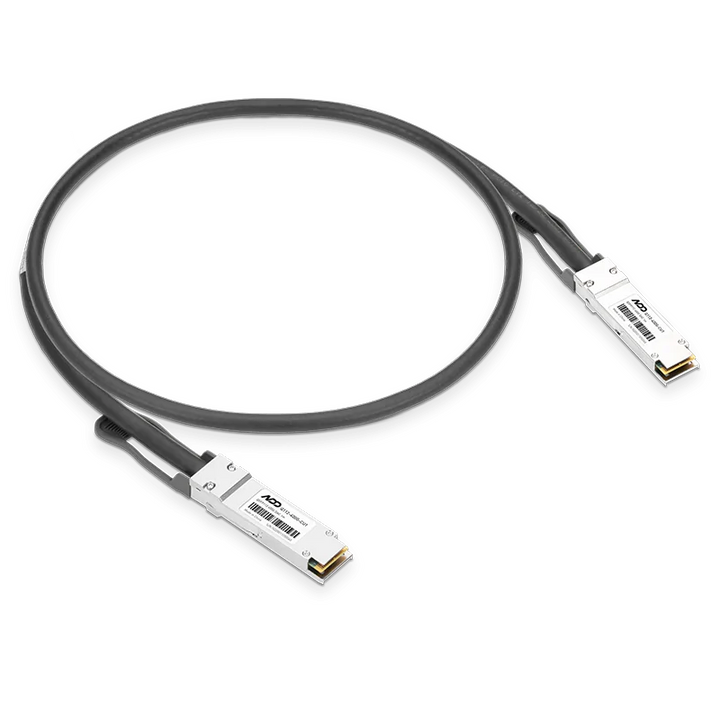

ASUS QSFP Cable for ASUS Ascent GX10 40cm
Currently out of stock. Request a quote and
our team will confirm the latest price, availability and lead time.
PRODUCT DESCRIPTION
ASUS QSFP Cable for ASUS Ascent GX10, 40cm (ASU-90MA0000-P01000) - Local Warranty
The Interconnect Cable That Links Two Ascent GX10 Units Together
The ASUS QSFP Cable for ASUS Ascent GX10 (ASU-90MA0000-P01000) is a short, direct-attach copper (DAC) cable purpose-built for one job: connecting two ASUS Ascent GX10 desktop AI supercomputers together over their onboard NVIDIA ConnectX-7 SmartNIC ports. It is an accessory for the GX10 platform, not a general-purpose network cable, and ASUS's own setup guide for linking two units specifies exactly this QSFP cable between them.
Why Link Two Ascent GX10 Units
Each ASUS Ascent GX10 carries 128 GB of unified LPDDR5x system memory shared between its Arm CPU and NVIDIA Blackwell GPU. Connecting two units with this cable and ASUS's published netplan configuration gives the pair a high-speed point-to-point link over ConnectX-7, which is what lets larger AI models — ones that do not fit in a single GX10's 128 GB — be split and run across both machines' combined memory. This is a clustering cable for local AI development, not a display or peripheral cable.
40cm Length — Desk or Shelf, Side by Side
At 40 cm (0.4 m), the cable is sized for two Ascent GX10 units sitting next to each other on a desk or a short shelf, not for a rack or a separate room. Passive DAC cables of this type are also low-latency and do not need external power or signal regeneration at this length, which keeps the point-to-point link simple to set up.
Supplied Locally, with GST Invoice
SourceIT supplies the ASUS QSFP Cable for ASUS Ascent GX10 with a full GST invoice and local Singapore support. Because it is a passive accessory cable rather than an active electronic component, ASUS's standard accessory warranty term applies — see the FAQ below, or email us to confirm before ordering if your procurement paperwork needs the exact figure.
Buying this cable to link two Ascent GX10 units? We stock the Ascent GX10 itself — email sales@sourceit.com.sg and we can quote both together with the correct netplan setup guidance.
ASUS ASU-90MA0000-P01000 Datasheet — Technical Specifications
General
| ASUS Product Name | ASUS QSFP Cable for ASUS Ascent GX10 |
| SKU | ASU-90MA0000-P01000 |
| Product Category | Direct-attach copper (DAC) interconnect cable, GX10 accessory |
| Compatible Device | ASUS Ascent GX10 desktop AI supercomputer (connects two units together) |
| Local Warranty (Singapore) | Included with every unit supplied by SourceIT, together with a GST invoice |
Cable
| Cable Type | QSFP direct-attach copper (DAC), passive |
| Length | 40 cm (0.4 m) |
| Connector Type | QSFP at both ends |
| Host Interface (GX10 Side) | NVIDIA ConnectX-7 SmartNIC, onboard |
| Data Rate | Sized to the Ascent GX10's onboard ConnectX-7 QSFP port — ASUS's Singapore product page does not print a standalone Gb/s figure for the cable itself; ask us if a specific link-rate figure is required for your documentation |
| Use Case | Point-to-point link between two Ascent GX10 units for clustered/combined-memory AI workloads |
Connectivity & Setup / Expansion
What It Connects To
This cable is specific to the ASUS Ascent GX10. It plugs into the QSFP port fed by each unit's onboard NVIDIA ConnectX-7 SmartNIC, and its only documented purpose is connecting two Ascent GX10 units to each other. It is not a cable for connecting a GX10 to a switch, a rack server, or general Ethernet infrastructure, and it is not a display or USB peripheral cable — the GX10's monitor and accessory connections are handled separately over its USB-C ports.
Setting Up the Link
ASUS publishes a step-by-step guide for pairing two Ascent GX10 units: connect the QSFP cable between both units, connect each to the internet separately, then apply ASUS's published netplan configuration file on each machine over a terminal session and verify the link with a ping test between the two assigned point-to-point IP addresses. The published guide is the authoritative reference for the exact commands — see the Datasheet & Downloads section below for the link.
Cable Handling and Routing
As a passive copper DAC cable, this one has a fixed minimum bend radius and should not be routed with a tight kink, particularly near the QSFP connector shell — a stressed or kinked DAC cable is a common cause of an intermittent or failed link that is otherwise hard to diagnose. Keep both Ascent GX10 units close enough that the 40 cm length is not under tension, and avoid running the cable alongside high-current power cabling if practical, though at this signalling class interference is rarely the actual cause of a problem.
One Cable, One Pair
Only one QSFP cable is needed to link two Ascent GX10 units — the point-to-point setup ASUS documents does not use a switch or additional cabling for a two-unit cluster. If you are planning a cluster of more than two Ascent GX10 units, email us before ordering, since that is a different topology from the one this cable and ASUS's published guide are for.
Package Contents & Ordering Information
In the Box
One 40 cm QSFP direct-attach copper cable. No adapters, mounting hardware or documentation booklet are included in the cable's own packaging; the pairing/netplan setup guide is published online by ASUS (see Datasheet & Downloads below).
Related Ascent GX10 Products — Ordering Information
SourceIT carries the ASUS Ascent GX10 desktop AI supercomputer alongside this cable. These are referenced here by SKU for comparison only — email sales@sourceit.com.sg quoting the SKU to check stock and lead time.
| ASU-90MA0000-P01000 (this listing) | QSFP cable, 40cm, for linking two Ascent GX10 units |
| ASUS Ascent GX10 | Desktop AI supercomputer, NVIDIA GB10 Grace Blackwell, 128GB unified memory — see our separate Ascent GX10 listings for exact SKUs and storage configurations |
Buying two Ascent GX10 units to cluster together? One cable links a pair — email us and we will confirm quantities and stock together.
Datasheet & Downloads
ASUS hosts the official product page for the Ascent GX10 platform and a support article covering the two-unit connection procedure this cable is used for. The links below are the current ASUS pages for this platform.
| ASUS Ascent GX10 product page | ASUS Ascent GX10 — Overview |
| ASUS support article: connecting two Ascent GX10 units | How to Connect Two ASUS Ascent GX10 |
For the cable's own datasheet, dimensional drawing, or the netplan configuration file referenced in the setup guide, email sales@sourceit.com.sg quoting ASU-90MA0000-P01000 and we will send you the current files directly.
Frequently Asked Questions — ASUS QSFP Cable for ASUS Ascent GX10
What is this cable actually for?
Connecting two ASUS Ascent GX10 desktop AI supercomputers to each other over their onboard NVIDIA ConnectX-7 SmartNIC QSFP ports, so the pair can be set up as a point-to-point cluster for AI workloads that need more than one unit's 128 GB of unified memory.
Will it work as a general Ethernet or switch cable?
It is a QSFP direct-attach copper cable intended specifically for the GX10-to-GX10 link ASUS documents. We would not recommend assuming it suits a different switch or NIC without checking compatibility first — ask us if you have a different use case in mind.
Do I need more than one cable for two GX10 units?
No. One cable connects one pair of units point-to-point, which is the topology ASUS's own setup guide describes.
Is 40cm long enough for my setup?
It is designed for two Ascent GX10 units placed close together, such as side by side on a desk or shelf. If you need the two units further apart than 40 cm allows, email us before ordering and we will check what ASUS supports.
Does connecting two units automatically combine their memory?
The cable and ASUS's published netplan configuration establish the network link between the two units; how a given AI framework then distributes a model across both machines' memory depends on that software's own multi-node support, not on the cable itself.
Is this cable powered or does it need a driver?
It is a passive copper cable — no external power, and no separate driver beyond what the Ascent GX10's ConnectX-7 SmartNIC already requires for normal operation.
What is the warranty on the cable?
ASUS's Singapore product page for this accessory does not print a separate warranty figure distinct from its standard local accessory support term. Email us to confirm the exact term before you order if your paperwork needs it stated precisely.
Does it come with a Singapore warranty and a GST invoice?
Yes. Every ASUS QSFP Cable for ASUS Ascent GX10 sold by SourceIT comes with a GST invoice and local Singapore support.
We Also Recommend


ASUS Ascent GX10 Ultra-Small AI Supercomputer NVIDIA GB10 - 128GB / 1TB


NVIDIA DGX Spark Personal AI Supercomputer GB10 Grace Blackwell - 128GB / 4TB


HP ZGX Nano G1n NVIDIA GB10 AI Station - 128GB / 4TB


ASUS Ascent GX10 Ultra-Small AI Supercomputer NVIDIA GB10 - 128GB / 4TB


ASUS Ascent GX10 Ultra-Small AI Supercomputer NVIDIA GB10 - 128GB / 2TB